Home Theater Chairs: Comfort, Layout and Buying Guide
Seating should be planned before buying large furniture or permanently installing speakers. Chair width, fully reclined depth, row spacing, screen position, and access routes can all determine whether the finished room works as intended.
This guide explains how to compare home theater seating, measure the room, choose upholstery and features, plan one or more rows, and avoid common buying mistakes.
1. Types of Home Theater Chairs
Dedicated cinema recliners are only one option. Sofas, loveseats, modular seating, and conventional lounge chairs can also work when they provide suitable support and an unobstructed view.
Individual theater recliners
Individual recliners are a popular choice for dedicated cinema rooms. Each viewer receives a defined seat, armrest, and reclining position.
They may be installed as separate chairs or connected to create a straight or gently curved row. Separate seats offer more layout flexibility, while connected rows can create a consistent cinema-style appearance.
Power recline allows precise adjustment but requires electrical connections. Manual recliners need less wiring and may be simpler to maintain.
Wall-hugger recliners
Wall-hugger or zero-clearance-style recliners are designed to require less space behind the chair as they open. They can be useful in shallow rooms, but the actual clearance varies by model.
Always check the manufacturer’s fully reclined dimensions. A product description should not replace accurate measurements.
Loveseats
A loveseat can be practical for couples, smaller rooms, or viewers who prefer shared seating.
Some theater-style loveseats have a removable or folding center armrest. This allows the unit to function as either two defined seats or a more open shared seat.
Connected cinema rows
Connected seating creates a traditional movie-theater appearance and can use room width efficiently.
Possible configurations include:
- Two-seat rows
- Three-seat rows
- Four-seat rows
- Rows with shared armrests
- Rows with a wider central loveseat
- Straight or curved arrangements
Check whether connected seating arrives in separate modules and how those modules are joined. This can affect delivery through doors, hallways, and stairs.
Modular seating
Modular seating can be rearranged or expanded later. It works well in multipurpose rooms used for movies, gaming, entertaining, and everyday relaxation.
Confirm that sections remain securely aligned and that the final arrangement does not block speakers, doors, or walkways.
Sofas and sectionals
A sofa or sectional can look more natural in a living room than dedicated cinema chairs. It may also accommodate different sitting and reclining positions.
The main limitation is that not every position may face the screen directly. Deep corner sections can be comfortable for conversation but less suitable for extended viewing.
Conventional lounge chairs
A supportive lounge chair can work well in a compact home theater. Dedicated cup holders and powered controls are optional; comfort and correct placement are more important.
2. Choose a Suitable Upholstery Material
Upholstery affects comfort, cleaning, durability, temperature, appearance, and how much sound the seating reflects or absorbs.
Leather
Leather can provide a premium appearance and is generally straightforward to wipe clean. Quality, texture, coating, softness, and durability vary significantly between leather types.
Leather can feel cool or warm depending on room temperature and may reflect more light than a dark matte fabric.
Faux leather
Synthetic leather can provide a similar appearance at a lower cost. Its durability depends on the construction and quality of the surface layer.
Some lower-quality materials may crack, peel, or become sticky with age, heat, and heavy use. Check warranty coverage and care instructions before buying.
Fabric
Fabric seating often feels softer and less sensitive to temperature than leather. It is available in many textures and colors and can help reduce some light reflection in a dark theater.
Fabric may require more effort to clean, particularly when exposed to drinks, food, children, or pets.
Performance fabric
Performance upholstery is designed to resist stains and everyday wear. It can be useful in frequently used family rooms, but stain resistance and cleaning methods vary by product.
Check which cleaning products are permitted. Using an unsuitable cleaner can alter the color, texture, or protective finish.
Choosing a color
Dark, matte upholstery is common in dedicated home theaters because it reflects less screen light. A living room may benefit from a color that coordinates with the rest of the furniture.
Avoid choosing upholstery from an online photograph alone. Request or inspect a sample when possible because color and texture can look different under room lighting.
3. Decide Which Seating Features Are Useful
Additional features can improve convenience, but they also add wiring, moving parts, cost, and potential maintenance.
Power recline
Power recline provides gradual adjustment and allows viewers to stop at different positions. It requires a suitable power supply and may make the seat heavier and more complicated to move.
Manual recline
Manual recliners do not require power for ordinary operation. They may be a practical choice when simplicity is more important than precise adjustment.
Adjustable headrest
An adjustable headrest can support the head and neck when the chair is reclined. It can also help keep the viewer’s eyes directed toward the screen rather than the ceiling.
Lumbar support
Adjustable lumbar support can improve comfort for some users, particularly during long viewing sessions. Test the support range rather than assuming that more padding will always feel better.
Cup holders
Cup holders keep drinks away from electronics and upholstery. Check their diameter, depth, and ease of cleaning.
Storage compartments
Armrest storage can hold remote controls, charging cables, headphones, and small accessories. Large compartments can increase armrest width and reduce the number of seats that fit in a row.
USB and power connections
Integrated charging can be useful for phones, tablets, controllers, and other small devices. Check connector type, power output, cable routing, and whether the charging components can be replaced.
Tray tables
A removable tray can support snacks or a small device. It should remain stable without obstructing the reclining mechanism or making it difficult to leave the seat.
Built-in lighting
Low-level cup-holder or base lighting can improve visibility, but bright LEDs may distract from the screen or reflect from nearby surfaces.
Choose seating with lighting that can be dimmed or switched off independently.
4. How to Measure the Room for Home Theater Chairs
Measure the room and create a seating plan before ordering furniture.
Record:
- Room width and depth
- Ceiling height
- Screen position and dimensions
- Door locations and opening direction
- Speaker and subwoofer positions
- Electrical outlets
- Heating and ventilation openings
- Columns, steps, and other fixed obstacles
- Required walkways and access routes
Use fully reclined dimensions
A recliner can require substantially more space when open than when upright. Obtain the following dimensions from the manufacturer:
- Overall width
- Upright depth
- Fully reclined depth
- Required rear clearance
- Seat height
- Armrest width
- Seat width and depth
Use the dimensions of the complete row rather than multiplying the width of one seat. Shared armrests and curved configurations can change the total measurement.
Mark the layout on the floor
Use removable tape to mark the planned chair footprint, fully reclined position, aisles, and row spacing.
Walk through the marked layout and confirm that doors can open, drawers or cabinets remain accessible, and viewers can leave the room without climbing over furniture.
Check delivery access
Measure every opening the furniture must pass through:
- Exterior doors
- Hallways
- Stairways
- Elevators
- Landings
- Doorways into the theater
Confirm whether the backs, arms, or seat modules can be removed for delivery and assembly.
5. Home Theater Seating Layout Ideas
Single row
A single row is usually the best solution for a compact room. It simplifies sightlines and reduces the need for a raised platform.
Do not automatically fill the entire wall with chairs. Leaving space at one or both sides can improve access and prevent the outer seats from being too close to surround speakers.
Two rows
Two rows increase capacity but require more room depth. The rear row may need to be raised so viewers can see over the people seated in front.
Both rows must have enough space for recline, access, and safe movement. Check the view from every position rather than planning only around the central seat.
Curved row
A curved row angles the outer seats toward the screen. This can improve orientation in a wide room and create a traditional cinema appearance.
Curved seating normally uses more depth and may reduce side-aisle space. Use the manufacturer’s complete row dimensions in both upright and reclined positions.
Loveseat and individual seats
A mixed row can combine a central loveseat with individual seats on one or both sides. This provides different seating preferences without requiring separate furniture groups.
Sofa with rear recliners
A sofa in the front row and individual recliners behind can create a flexible, family-oriented arrangement. The rear row may require a riser, depending on screen height and sightlines.
Multipurpose layout
Modular seating or a sofa can be more suitable when the room is also used for gaming, music, exercise, or social gatherings.
For planning the display, audio system, sources, and room layout together, see our complete home theater setup guide.
6. Plan Viewing Distance and Sightlines
The ideal seat position depends on screen size, image resolution, screen height, room dimensions, and personal viewing preference.
Avoid placing the front row so close that viewers must continually move their heads or look sharply upward. A seat that feels immersive for one person may feel overwhelming for another.
Test the proposed position
Before ordering furniture, place an ordinary chair in the planned location and view representative content. Check:
- Whether the whole screen can be viewed comfortably
- Whether the viewing angle feels natural
- Whether subtitles are easy to follow
- Whether the screen appears too small or overwhelming
- Whether speakers or furniture block any part of the image
Check every seat
The central seat may have the best view, but outer positions should still provide a comfortable angle. Very wide rows can place the outside chairs too far off-axis.
For projector installations, screen size, throw distance, lens placement, and image brightness must be planned together. Our true 4K projector guide explains the main projector specifications and installation considerations.
7. Seating Risers and Multiple Rows
A seating riser is a raised platform intended to improve the sightlines of a rear row.
The required height depends on:
- Screen position and height
- Distance between rows
- Seat height
- Viewer height
- Floor level
- Ceiling height
- The desired viewing angle
There is no universal riser height suitable for every room. Sightlines should be calculated or tested using the actual seating and screen positions.
Riser safety
A riser must be stable and suitable for the weight of the furniture and occupants. Steps, edges, electrical connections, and floor transitions need careful planning.
Construction may be subject to local building, electrical, accessibility, or fire-safety requirements. Consult qualified professionals when necessary.
Step and pathway lighting
Low-level lighting can make steps and platform edges easier to see without illuminating the entire theater.
The lights should be dimmable or independently controllable so that they do not distract from the screen. For controls, scenes, and sensor options, see our smart home lighting guide.
Do not forget ceiling clearance
Raising the rear row reduces the available headroom. Check ceiling lights, projectors, beams, soffits, and other overhead obstructions before determining platform height.
8. Comfort and Ergonomics
Home theater seating may be used for several hours, so comfort should take priority over appearance and feature count.
When testing a chair, consider:
- Lower-back support
- Head and neck position
- Seat width
- Seat depth
- Seat height
- Armrest height
- Footrest length and position
- Padding firmness
- Ease of entering and leaving the chair
- Comfort in both upright and reclined positions
Seat depth
A deep seat may feel comfortable initially but can be unsuitable for shorter viewers if their feet cannot rest naturally or their lower back loses support.
Headrest position
A headrest should support the viewer without pushing the head too far forward. Test it while looking at a screen position similar to the planned installation.
Footrest support
The footrest should support the legs without creating uncomfortable pressure. Check whether it remains comfortable during both short programs and longer films.
Ease of movement
Very low or deeply reclined chairs may be difficult for some people to enter and leave. Consider the needs of children, older guests, and people with limited mobility.
If several people will use the theater regularly, allow them to test the seating before purchase whenever possible.
9. Coordinate Seating With Speaker Placement
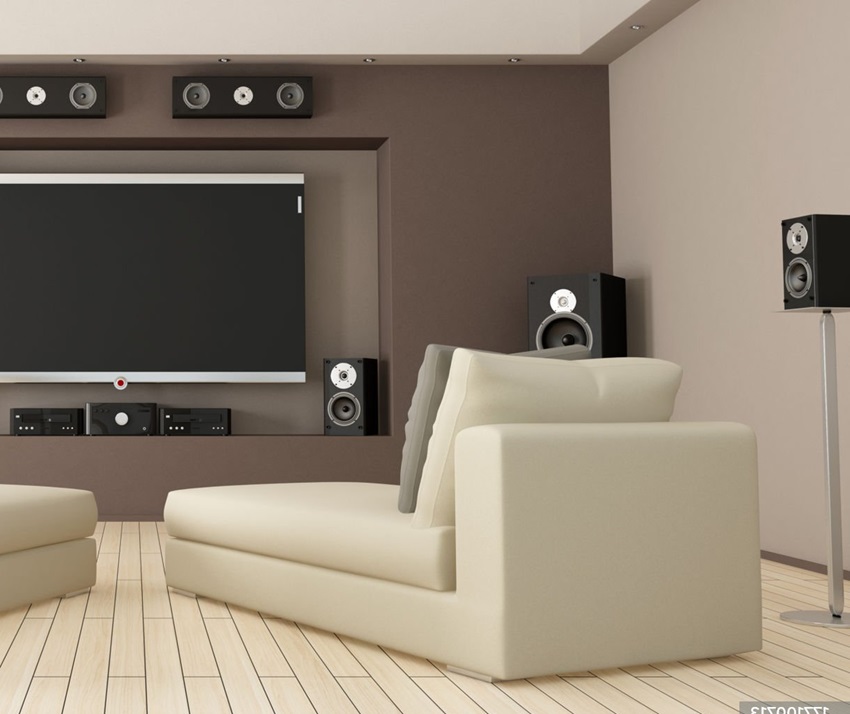
Seating and speaker positions should be planned together. Moving a chair after calibration can change the listening experience and place viewers too close to a surround speaker.
Front speakers
The main seating area should face the front soundstage. Avoid placing outer seats so far to the side that the screen and front speakers are viewed from an uncomfortable angle.
Surround speakers
Surround speakers should be positioned according to the selected audio layout. Do not place chair backs directly against speaker drivers or position one viewer extremely close to a surround speaker.
Height speakers
For an immersive-audio system, seating position influences where overhead, ceiling-mounted, or upward-firing speakers should be located.
Subwoofers
Do not allow seating to block a subwoofer driver or port. Also avoid selecting chair positions solely because they produce the strongest bass; smoother, more balanced bass is generally preferable.
Chair construction and sound
Very high seat backs can affect how sound reaches the ears, particularly from rear and surround speakers. Test the audio from the actual seated position when possible.
10. Plan Power, Lighting, and Cable Routes
Power recliners, USB charging ports, motors, lighting, and accessories require safe electrical connections.
Before installing the chairs, determine:
- How many seats require power
- Where outlets are located
- Whether floor outlets are needed
- How cables will be protected
- Whether the seating modules move while reclining
- Whether cables remain accessible for maintenance
Do not route loose power cables across walkways or beneath moving mechanisms where they can be pinched or damaged.
Use only power supplies and accessories approved for the seating. Electrical modifications should comply with local requirements and be performed by a qualified electrician when necessary.
Wireless charging and USB ports
Integrated charging is convenient, but connector standards and device requirements can change. A nearby replaceable outlet may remain useful even when the chair includes built-in charging.
Keep lighting subtle
Base and cup-holder lights should not reflect on the screen or illuminate viewers during dark scenes. Confirm that they can be switched off separately.
11. What to Check Before Buying
Whenever possible, sit in the chair before ordering. Online dimensions and photographs cannot fully describe firmness, support, upholstery texture, or headrest position.
Use this checklist:
- Upright and fully reclined dimensions
- Required wall clearance
- Complete row width
- Seat width, depth, and height
- Maximum recommended user weight
- Upholstery material and cleaning instructions
- Manual or powered recline
- Power requirements
- Warranty for the frame, upholstery, motors, and electronics
- Availability of replacement power supplies and controls
- Delivery dimensions
- Assembly requirements
- Return and exchange conditions
Check the complete price
The displayed price may apply to one seat rather than the complete row. Confirm whether armrests, consoles, tray tables, lighting, power controls, delivery, and assembly cost extra.
Check samples and finish details
Inspect an upholstery sample when possible. Confirm the color, texture, stitching, seams, and appearance under lighting similar to the theater room.
Consider maintenance
Food, drinks, dust, and regular use will eventually affect the seating. Choose materials that can be maintained realistically rather than selecting appearance alone.
12. Common Home Theater Seating Mistakes
- Buying chairs before measuring: the room plan should include upright and fully reclined dimensions.
- Forgetting delivery access: furniture may not fit through doors, stairs, or hallways.
- Adding too many seats: capacity should not eliminate safe and comfortable walkways.
- Ignoring recline clearance: chairs and rows may collide when opened.
- Checking only the central sightline: every seat needs a usable view.
- Choosing appearance over comfort: premium-looking seating can still provide poor support.
- Using a riser without checking headroom: the rear row may become too close to the ceiling or projector.
- Placing seats too close to surround speakers: sound may become unbalanced for individual viewers.
- Ignoring power requirements: powered features need safe, accessible connections.
- Routing cables through moving parts: reclining mechanisms can pinch or damage them.
- Using distracting built-in lights: bright LEDs can reflect from the screen.
- Not checking warranty terms: upholstery, motors, electronics, and frames may have different coverage.
Frequently Asked Questions
Are home theater recliners necessary?
No. Sofas, loveseats, modular seating, and supportive lounge chairs can all work well. Dedicated recliners mainly provide cinema-style positioning and integrated convenience features.
How much space does a theater recliner need?
It depends on the model. Use the manufacturer’s fully reclined depth, required rear clearance, and complete row width rather than estimating from the chair’s upright dimensions.
How much space should be left between theater rows?
There is no universal distance. The correct spacing depends on fully reclined chair depth, footrest movement, access requirements, sightlines, and whether both rows need to recline simultaneously.
Is leather or fabric better for home theater seating?
Neither is universally better. Leather is generally easy to wipe clean, while fabric may feel softer and reflect less light. Consider comfort, maintenance, temperature, durability, and room design.
Do I need a riser for two rows?
Not always. A riser is useful when viewers in the second row cannot see the screen comfortably over the first row. The required height must be determined from the actual screen and seating positions.
How many chairs should I install?
Install only as many seats as the room can accommodate while preserving suitable sightlines, reclining clearance, speaker placement, and safe access.
Are curved theater rows better?
A curved row can angle outside viewers toward the screen, but it usually requires more space than a straight configuration. The better option depends on room width and seating capacity.
Should home theater chairs have USB ports?
USB charging is convenient but not essential. Consider whether the charging hardware can meet your needs and whether a replaceable nearby power outlet would provide greater long-term flexibility.
Can theater recliners be placed against a wall?
Only if the chair is designed for the available clearance. Check the manufacturer’s required distance from the wall in both upright and fully reclined positions.
Should I buy the chairs before installing the screen?
The seating and screen should be planned together. Confirm sightlines, viewing comfort, and row positions before permanently mounting the screen or ordering furniture.
Final Home Theater Seating Checklist
- Measure the room, doors, hallways, and delivery route.
- Obtain upright and fully reclined chair dimensions.
- Mark complete rows and walkways on the floor.
- Test the proposed viewing distance and screen angle.
- Check sightlines from every planned seat.
- Coordinate seating with surround and height speakers.
- Calculate riser height from the actual room layout.
- Check ceiling clearance above any raised row.
- Plan safe electrical connections for powered features.
- Test comfort in upright and reclined positions.
- Review upholstery samples and care instructions.
- Confirm warranty, delivery, assembly, and return terms.
The best home theater chairs are the ones that fit the room, support comfortable viewing, and leave enough space for movement, reclining, speakers, and equipment.
A smaller number of comfortable, well-positioned seats will usually create a better viewing experience than filling the room with the maximum possible number of chairs.