Advantages of Wireless Speakers: Benefits and Limitations
The main advantages of wireless speakers are easier installation, flexible placement, and convenient control.
They reduce the need for long audio cables and can make multi-room listening much simpler.
However, “wireless” rarely means completely free from cables.
Most home wireless speakers contain amplifiers and still need electrical power.
Some stereo pairs also require a cable between the left and right speakers.
Wireless speakers can use Bluetooth, Wi-Fi, or a manufacturer’s dedicated connection.
Each method serves a different purpose.
Understanding these differences will help you choose the right system.

What Are Wireless Speakers?
Wireless speakers receive audio without a conventional signal cable running back to the source.
The signal may come from a phone, television, computer, streamer, soundbar, or network.
Most consumer wireless speakers are active or powered.
They contain the amplification needed to drive their speaker units.
They therefore do not usually need a separate stereo amplifier or AV receiver.
The word “wireless” describes the audio connection.
It does not necessarily describe the power connection.
A stationary wireless speaker normally plugs into an electrical outlet.
Portable speakers can operate from rechargeable batteries.
Wireless surround speakers may use batteries, power adapters, or small receiver modules.
Always check what cables the complete system requires.
How Do Wireless Speakers Work?
The source device converts audio into digital data.
It then transmits that data through a supported wireless connection.
The receiving speaker processes the signal and converts it back into audio.
Its internal amplifier supplies power to the speaker drivers.
A wireless speaker may contain:
- a Bluetooth or Wi-Fi radio
- digital signal processing
- one or more power amplifiers
- speaker drivers
- volume and playback controls
- streaming-service support
- room adjustment or equalization
Some products perform all these functions inside one enclosure.
A stereo pair may divide the electronics between two speakers.
Check whether the pair communicates wirelessly or through a linking cable.
For more information about built-in and external amplification, see
Do I Need an Amplifier?
Types of Wireless Speakers
Wireless speakers are not a single product category.
They use several connection methods and serve different purposes.
Bluetooth Speakers
Bluetooth normally creates a direct connection between the source and speaker.
It is common in portable speakers, compact home systems, and powered stereo speakers.
Bluetooth is useful when you want:
- quick pairing with a phone or tablet
- simple one-room listening
- operation without a home Wi-Fi network
- a portable battery-powered speaker
- broad compatibility with mobile devices
The real operating range depends on the speaker, source device, walls, interference, and radio design.
A connection that works outdoors may cover a shorter distance inside a building.
Bluetooth usually sends audio from the phone or other source throughout playback.
Moving the source out of range can interrupt the music.
Calls, notifications, and power-saving settings may also affect playback.
Wi-Fi Speakers
Wi-Fi speakers connect to a home network.
Many can retrieve music directly from a streaming service after receiving a command from an app.
Network-based speakers may support:
- multi-room playback
- synchronized speaker groups
- independent music in different rooms
- higher-bandwidth audio formats
- voice or smart-home control
- network streaming from computers or storage devices
Wi-Fi is not automatically superior to Bluetooth in every system.
Sound quality depends on the source, codec, speaker design, processing, and implementation.
Wireless TV Speakers
Some powered stereo speakers connect to a television through HDMI ARC or eARC.
The TV sends audio to one speaker, which then distributes it to the other.
Other TV speakers use optical audio, Bluetooth, or a dedicated transmitter.
Check whether the product supports volume control through the television remote.
Wireless Home Theater Speakers
Soundbars and surround systems often use proprietary wireless links.
These connect rear speakers or a subwoofer to the main soundbar.
A dedicated link can help the manufacturer control synchronization and channel assignment.
It does not guarantee compatibility with products from other brands.
Portable Wireless Speakers
Portable models normally combine Bluetooth with a rechargeable battery.
Some include weather protection, microphones, USB charging, or stereo-pairing functions.
Battery runtime varies with volume, temperature, wireless use, and battery age.
Treat the advertised runtime as an estimate rather than a guarantee.
Main Advantages of Wireless Speakers
1. Fewer Audio Cables
Wireless transmission reduces the need for signal cables across the room.
This is useful where cables would cross walkways or remain visible along walls.
A wireless installation may still include power cables, HDMI cables, or a connection between speakers.
The amount of wiring depends on the system.
2. Easier Installation
Many wireless speakers combine the speaker, amplifier, streaming hardware, and controls.
This can remove the need to select several separate components.
Setup may involve connecting power, installing an app, and joining a network.
A Bluetooth speaker can be even simpler because it may not need network configuration.
3. Flexible Placement
Wireless audio makes it easier to reposition speakers without changing a long cable route.
This helps when furniture, seating, or room use changes.
Placement still affects sound quality.
Stereo speakers need suitable spacing and orientation.
Surround speakers should remain near their intended channel positions.
4. Built-In Amplification
Most wireless speakers contain amplifiers selected for their drivers.
The manufacturer can also coordinate amplification with crossovers, processing, and protection.
This eliminates amplifier matching for many buyers.
It also reduces the number of separate components in the room.
5. Convenient Control
Wireless speakers may support control from a phone, tablet, remote, voice assistant, or smart-home platform.
Available options depend on the product.
An app may provide access to:
- volume and mute controls
- music and input selection
- speaker grouping
- equalization
- room correction
- alarms and sleep timers
- firmware updates
6. Easy System Expansion
Compatible network speakers can often be added one room at a time.
This avoids installing a complete whole-home audio system at once.
Expansion normally works best within one ecosystem.
Confirm compatibility before buying products from different ranges or generations.
7. Portable Listening
Battery-powered models can move between rooms or travel outside the home.
This flexibility is not available from a permanently installed wired speaker.
Portability may involve compromises in bass extension, maximum output, and stereo separation.
Choose according to how the speaker will be used most often.
Simpler Installation and More Flexible Placement
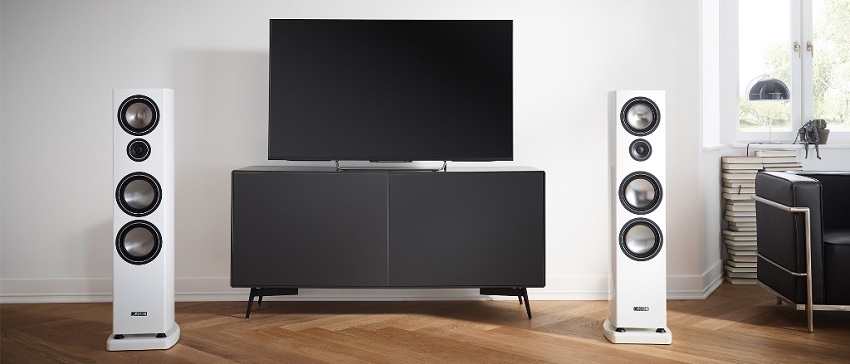
Wireless speakers can help preserve a clean interior.
They reduce visible signal cables and avoid some difficult routes through walls, floors, or ceilings.
This is especially helpful in:
- apartments and rental homes
- finished rooms that cannot be rewired easily
- bedrooms and home offices
- open-plan living areas
- rooms where furniture changes frequently
Electrical outlets still need careful planning.
A wireless rear speaker may require a power cable behind the sofa.
A wireless subwoofer also needs a nearby outlet.
Avoid using long extension cables across walkways.
If no safe outlet is available, a wired passive-speaker system may be easier than adding new electrical connections.
Wireless Multi-Room Audio
Multi-room playback is one of the strongest advantages of network speakers.
Compatible models can play audio in several areas without a central rack of amplifiers.
Depending on the platform, you may be able to:
- play the same music throughout the home
- choose different music for each room
- group and separate rooms from an app
- adjust each room’s volume independently
- move playback from one room to another
- combine speakers into a stereo pair
The experience depends heavily on the manufacturer’s software.
Check the app, supported music services, account requirements, and update policy.
Also confirm that all intended speakers can join the same group.
Having Wi-Fi does not automatically make products from different brands interoperable.
A stable network is essential.
If coverage is weak, see our guide to building a
fast and stable home network.
Advantages of Wireless Speakers for Home Theater

Rear speaker wiring can be difficult in a completed living room.
Wireless surround products reduce the need to run audio cables from the front equipment to the seating area.
Common configurations include:
- a soundbar with a wireless subwoofer
- a soundbar with wireless rear speakers
- powered wireless speakers connected to a television
- a proprietary wireless surround package
- an AV receiver with compatible wireless speaker options
The rear speakers may still need power cords.
Some systems power both rear channels from one wireless amplifier module.
Speaker cables then run from that module to the individual speakers.
Do not assume that ordinary Bluetooth speakers can become surround channels.
Home theater requires correct channel assignment and close synchronization with the picture and other speakers.
Choose a package designed for multichannel television sound.
Check the number of physical speakers, supported formats, connection type, and expansion options.
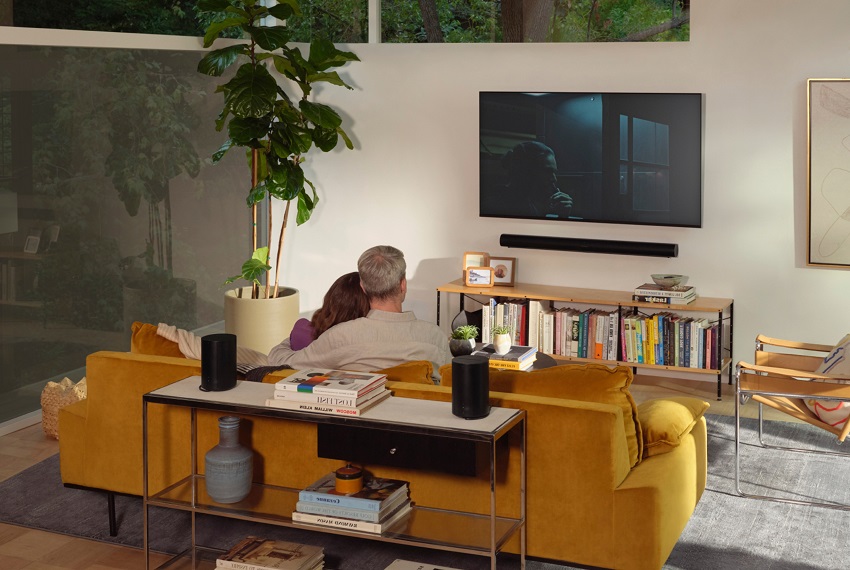
Wireless technology simplifies installation but does not replace good room planning.
Our
home theater design guide
explains screen, seating, speaker, lighting, and equipment placement.
Do Wireless Speakers Sound as Good as Wired Speakers?
Wireless speakers can produce excellent sound.
The connection method alone does not determine performance.
Sound quality depends on:
- driver and enclosure design
- amplifier quality
- digital processing
- supported codecs and formats
- speaker placement
- room acoustics
- source quality
- required listening level
A well-designed wireless speaker can outperform a basic wired system.
A carefully selected passive system can also outperform many wireless products.
The comparison should involve complete systems at similar prices.
Does Compression Matter?
Some wireless connections use lossy audio compression.
Whether the difference is noticeable depends on the codec, recording, speaker, room, and listener.
Network speakers may support lossless audio.
However, a lossless connection does not guarantee better speakers or better room performance.
Do Wireless Speakers Have Delay?
Digital processing and wireless transmission introduce latency.
Music-only systems can buffer audio and keep grouped speakers synchronized.
TV and gaming require closer synchronization between sound and picture.
Use a connection and speaker system designed for this purpose.
HDMI ARC or eARC is often more suitable than generic Bluetooth.
Limitations of Wireless Speakers
Wireless systems provide convenience, but they also introduce trade-offs.
Consider them before replacing a wired system.
Most Still Need Power Cables
A stationary active speaker requires electricity.
A stereo pair may need one or two outlets.
Wireless surrounds and subwoofers also commonly use power cords.
Dependence on Wireless Coverage
Walls, distance, interference, router placement, and network congestion can affect performance.
Dropouts may occur when the wireless connection is unstable.
Possible Latency
Delay can be noticeable with television, games, video editing, or musical instruments.
Products designed only for music streaming may not provide suitable low-latency inputs.
Ecosystem Restrictions
Many multi-room and home theater systems use proprietary technology.
A speaker from another brand may not join the same synchronized group.
Even products from one manufacturer may have generation or feature restrictions.
Review the compatibility information before expanding a system.
Software Dependence
Setup, streaming, and grouping may depend on an app or cloud service.
Changes to software support can affect features even when the speaker hardware still works.
Check whether basic inputs and controls remain available without an online account.
Local connections can provide a useful fallback.
More Electronics Inside the Speaker
Wireless speakers combine drivers with amplifiers, network components, and processors.
A failure in one area may affect the complete product.
Traditional passive speakers contain fewer electronic components.
They can usually be paired with a replacement amplifier if the original amplifier fails.
Battery Aging
Rechargeable portable and surround speakers lose battery capacity over time.
Check whether the battery can be serviced or replaced.
Wireless Does Not Guarantee Lower Cost
Built-in amplifiers, radios, processing, and software can increase the price.
Savings may come from easier installation rather than cheaper equipment.
Privacy and Account Requirements
Smart speakers may include microphones, voice services, usage analytics, or mandatory accounts.
Review the privacy settings and microphone controls before purchase.
Wired vs Wireless Speakers
Choose Wireless Speakers When:
- running long audio cables is difficult
- you want simple phone or tablet playback
- multi-room audio is a priority
- you prefer built-in amplification
- the room layout may change
- portable listening is important
- you accept the limits of a particular ecosystem
Choose Wired Passive Speakers When:
- long-term component compatibility matters
- you want to replace speakers and amplifiers separately
- you are building a custom receiver-based theater
- speaker cables can be installed safely
- you want less dependence on apps and software
- you already own a suitable amplifier or AV receiver
A mixed system is also possible.
For example, a home theater can use wired front speakers with a wireless subwoofer or wireless rear module.
How to Choose Wireless Speakers
Start with the intended use.
A portable Bluetooth speaker, Wi-Fi stereo pair, and wireless surround system solve different problems.
For Portable Listening
Check battery runtime, charging method, weather resistance, weight, Bluetooth support, and maximum useful volume.
Do not choose from battery capacity alone.
For Stereo Music
Look for a matched left and right pair.
Check how the speakers communicate and whether both require electrical power.
Useful connections may include optical audio, HDMI eARC, USB, analog input, and a subwoofer output.
Streaming-service and format support may also matter.
For Multi-Room Audio
Evaluate the entire platform rather than one speaker.
Check app quality, grouping, supported services, account requirements, product compatibility, and software history.
For Television
Check HDMI ARC or eARC support, optical input, remote compatibility, dialogue clarity, and audio delay.
Bluetooth alone may not provide the best TV experience.
For Home Theater
Confirm that the system supports the required number of channels.
Check whether surround speakers and the subwoofer are included or sold separately.
Also verify:
- supported Dolby and DTS formats
- physical versus virtual surround channels
- rear-speaker power requirements
- room-calibration features
- HDMI and gaming compatibility
- future expansion options
General Buying Checklist
- Does every speaker fit the intended location?
- Are suitable electrical outlets available?
- Does the product support your source devices?
- Will it work without a permanent internet connection?
- Can it join your existing speaker ecosystem?
- Does it support proper stereo or surround pairing?
- Are replacement batteries or repairs available?
- Does the manufacturer provide useful software updates?
Frequently Asked Questions About Wireless Speakers
What is the biggest advantage of wireless speakers?
The main advantage is easier installation.
Wireless transmission reduces long signal cables and can provide flexible control and placement.
Are wireless speakers completely wireless?
Usually not.
Most stationary wireless speakers need power cables.
Some stereo and surround products also use cables between parts of the system.
Do wireless speakers need an amplifier?
Most wireless speakers contain built-in amplification.
They do not normally need a separate power amplifier.
Check the manual because unusual passive wireless systems also exist.
Can wireless speakers sound as good as wired speakers?
Yes.
A well-designed wireless system can produce excellent sound.
Performance depends on the complete speaker, source, processing, placement, and room.
Is Wi-Fi better than Bluetooth?
Wi-Fi is often more suitable for multi-room playback and network streaming.
Bluetooth is convenient for direct connections and portable use.
Neither is best for every situation.
Do Wi-Fi speakers work without the internet?
Some local features may work through the home network without internet access.
Streaming services, voice assistants, setup, or account functions may require an internet connection.
Check the individual product.
Can I use ordinary Bluetooth speakers as home theater surrounds?
Usually not.
A surround system needs correct channel assignment and synchronization.
Use speakers designed to work with the soundbar, receiver, or home theater platform.
Can wireless speakers connect to any television?
Compatibility depends on the available connections.
Check Bluetooth, HDMI ARC or eARC, optical audio, and analog outputs.
Also confirm that volume control and audio synchronization work correctly.
Can speakers from different brands work together?
They may work individually through standard connections.
However, synchronized multi-room and surround functions often require one compatible ecosystem.
Are wireless speakers good for gaming?
They can be, but latency is important.
Choose a system designed for television or gaming and use its recommended low-delay connection.
Are wireless speakers more expensive?
Not always, but their price includes amplification, wireless hardware, and processing.
Installation may be easier even when the equipment itself costs more.
Are wireless speakers secure?
Security depends on the product and network.
Use current firmware, secure account passwords, and protected Wi-Fi.
Review microphone and privacy settings on smart speakers.
Final Thoughts
The greatest benefits of wireless speakers are convenient installation, flexible control, and reduced signal wiring.
Wi-Fi models can also make multi-room audio easier to build and expand.
These advantages come with trade-offs.
Most speakers still need electrical power.
Some depend on proprietary apps, networks, batteries, and long-term software support.
Bluetooth works well for portable and direct listening.
Wi-Fi is often better suited to networked home audio.
Dedicated wireless links are usually the safest choice for synchronized surround speakers.
Choose wireless speakers when their convenience solves a real installation or control problem.
Choose wired passive speakers when component flexibility and long-term independence are more important.