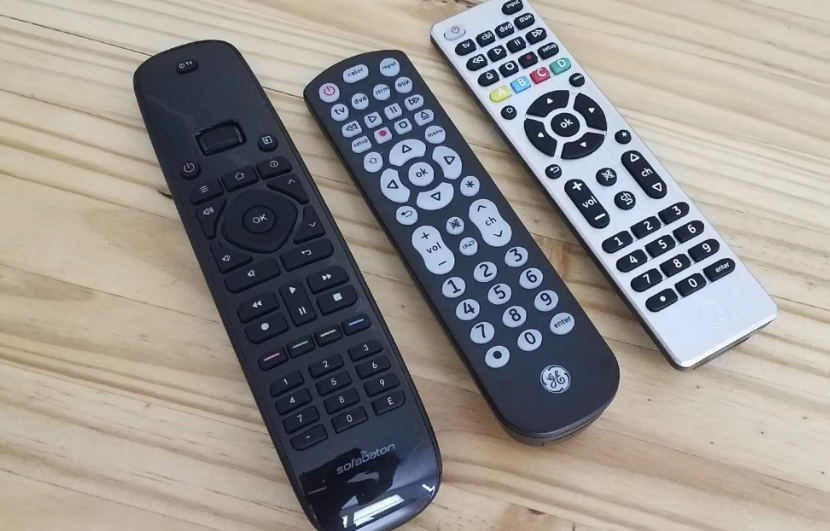
The Best Universal Remotes + Complete Remote Code List
Universal remote codes depend on the manufacturer, model, and code-list version of the remote as well as the device you want to control.
This means there is no single Samsung, LG, Sony, TCL, or Vizio code that works with every universal remote. A code used by a GE or Philips remote made by Jasco may be different from the code required by an RCA or One For All model.
To find the correct code, identify both pieces of equipment: the exact universal remote and the television, soundbar, Blu-ray player, streaming device, or AV receiver it needs to control.
Explore related guides:
DIY Home Theater Guide •
Home Theater Design Ideas •
How to Organize a Home Theater
What You Need Before Starting
Collect the following information before searching for codes:
- the brand of the universal remote;
- the remote’s exact model number;
- its code-list version or revision number, if applicable;
- the type of device being programmed;
- the device manufacturer;
- the device model number;
- the original remote, if it is still available.
The universal remote’s model information may appear:
- inside the battery compartment;
- on the underside of the battery cover;
- on the back of the remote;
- on the original packaging;
- on the front or back of its manual.
Install Fresh Batteries
Weak batteries can reduce infrared range and cause inconsistent results during programming. Install fresh batteries using the type and orientation specified by the remote manufacturer.
Identify the Device Model
The controlled device’s model number is normally printed on a label on its back, underside, or rear connection panel. It may also appear in the device’s settings menu or original documentation.
Do not rely only on the name printed on the front. Two televisions from the same brand may use different control systems or require different setup codes.
How to Find the Correct Universal Remote Code
The most reliable code source is the manual or official support database for the universal remote—not a generic list based only on the television brand.
Use this process:
- Identify the universal remote manufacturer and model.
- Check whether the remote has a code-list revision.
- Open the manufacturer’s manual or official code finder.
- Select the device type, such as TV, audio, DVD, or streaming player.
- Select the manufacturer of the device being controlled.
- Try the listed codes in the order provided.
- Test Power, Volume, Mute, Input, Menu, and navigation buttons.
- If functionality is incomplete, try the next code for the same brand.
Why the Remote Model Matters
Universal remotes store their own internal code libraries. Different models may contain different command sets, even when they carry the same brand name.
For example, Jasco identifies several code-list versions for its GE, Philips, and UltraPro remotes. A code listed for one version may not be valid for another.
Why the Device Brand Is Not Enough
A television manufacturer may use several infrared command sets across different product generations. Some codes may control basic functions while others provide more complete access to inputs, menus, navigation, or smart features.
Official Universal Remote Code Finders
Use the support site belonging to the manufacturer of your universal remote.
GE, Philips and UltraPro Remotes Made by Jasco
Jasco’s code finder requires the code-list version, device category, and device brand. The version is commonly identified as CL3, CL4, CL5, or CL6 and can usually be found inside the battery compartment.
Find GE, Philips and UltraPro universal remote codes
RCA Universal Remotes
RCA’s finder asks for the remote’s revision number, controlled-device brand, and device type.
Open the RCA Remote Code Finder
One For All Remotes
One For All provides model-specific support, manuals, and a setup-code finder. Locate the product number before using the tool.
Other Remote Brands
For another manufacturer, search its official support website using the remote’s exact model number followed by “manual” or “code list.”
Avoid assuming that codes from a different remote brand will work simply because the controlled television or soundbar is the same.
How Universal Remote Codes Work
Most traditional universal remotes control televisions and other entertainment equipment using infrared signals. The remote sends a pattern of infrared commands associated with actions such as Power, Volume Up, Input, or Menu.
A setup code selects one of the command sets stored in the universal remote’s memory.
The Code Belongs to the Remote’s Database
The numeric code is not an identification number permanently assigned to a television brand. It is an instruction telling a particular universal remote which command set to use.
That is why the same TV may require:
- one code on a GE remote;
- another code on an RCA remote;
- a different code on a One For All model;
- no numeric code at all when configured through an app.
Several Codes May Control the Same Device
A brand may have several compatible code sets. One may operate only Power and Volume, while another may also control Input, Menu, navigation, playback, or additional features.
Do not stop testing after the first code that turns the device off. Check the main functions before saving or accepting the configuration.
Programming a Universal Remote by Direct Code Entry
Direct entry is usually the quickest programming method when you have the correct code list.
The precise button sequence varies, but a typical process is:
- Turn on the device you want to control.
- Place fresh batteries in the universal remote.
- Press and hold the Setup or equivalent programming button.
- Wait for the indicator light described in the manual.
- Press the appropriate device button, such as TV, Audio, DVD, or AUX.
- Enter the code from the correct manufacturer and revision list.
- Point the remote at the device and test Power.
- Test Volume, Mute, Input, Menu, and navigation.
- If any essential functions fail, repeat the procedure with the next listed code.
These steps are only a general outline. Follow the manual for the exact remote because indicator behavior, programming buttons, and code lengths vary.
Save the Working Code
After finding a fully compatible code, write it inside the manual, save it in a phone note, or attach a small label inside the battery cover if doing so does not obscure the manufacturer’s information.
This will make future setup easier if the remote is reset or replaced.
Using Automatic Code Search
Automatic code search allows the remote to test command sets stored in its memory until the controlled device responds. This is useful when the printed list is unavailable or none of the direct-entry codes works.
A typical search involves:
- Turning on the device manually.
- Putting the remote into programming mode.
- Selecting the correct device category.
- Pointing the remote at the device.
- Starting the search sequence.
- Waiting for the device to respond.
- Saving the selected command set.
- Testing all important controls.
The remote may test one code at a time or send them in groups. Follow the model-specific instructions carefully so you do not continue past a working code or save the wrong setting.
Do Not Test Only the Power Button
A code that powers the TV on and off may still fail to control Volume, Input, Home, or navigation. Test several functions before deciding that the search was successful.
If the result is only partially compatible, continue the search for another command set.
Using the Remote’s Learning Function
A learning remote can copy supported infrared commands directly from an original remote. This can help when:
- no built-in code controls the device;
- the selected code lacks an important function;
- the device is older or uncommon;
- you want to assign a specific command to a programmable button.
Typical Learning Process
- Place the original and learning remotes on a flat surface.
- Position their infrared ends as directed by the manual.
- Put the universal remote into learning mode.
- Select the button that will receive the command.
- Press the corresponding button on the original remote.
- Wait for the confirmation indicator.
- Repeat for additional functions.
- Exit learning mode and test the commands.
Install reliable batteries in both remotes and keep them still while commands are being copied.
Learning Has Limitations
Many learning remotes copy infrared commands only. They may not learn Bluetooth or radio-frequency commands, and memory may be limited to a certain number of buttons.
Programming Different Device Types
Televisions
Test Power, Volume, Mute, Input, Menu, Home, directional navigation, and number buttons where applicable. Smart-TV application shortcuts and voice functions may not be available through a basic infrared remote.
Soundbars
Basic remotes may control Power, Volume, and Mute. Input selection, sound modes, subwoofer adjustment, and other specialized functions may require a more complete code, learning capability, or the original remote.
AV Receivers
Make sure the universal remote is programmed in an audio or receiver device mode. Test Power, Volume, Mute, Input, and menu navigation.
Advanced calibration, zone control, surround modes, or configuration settings may still require the receiver’s original remote or mobile application.
Blu-ray and DVD Players
Test Power, Play, Pause, Stop, directional navigation, Menu, and disc-eject controls. Some codes may provide playback controls but incomplete menu navigation.
Streaming Devices
Compatibility varies because streaming products may use infrared, Bluetooth, Wi-Fi, radio-frequency communication, or a combination of methods.
A basic infrared universal remote may control a streaming box with an infrared receiver but fail completely with a stick designed primarily for Bluetooth or radio-frequency control.
Cable and Satellite Receivers
Use the device category identified in the universal remote’s manual. In addition to Power and navigation, test Guide, Channel, DVR playback, Info, and Exit functions.
IR, Bluetooth, Wi-Fi and RF Compatibility
Before buying a universal remote, identify how each device receives commands.
Infrared
Infrared is common on televisions, soundbars, disc players, and AV receivers. It usually requires the remote to be pointed generally toward the device with a reasonably clear line of sight.
Bluetooth
Bluetooth is used by some streaming devices, smart televisions, game systems, and voice remotes. A basic infrared universal remote cannot reproduce Bluetooth commands unless it includes specific Bluetooth support.
Radio Frequency
Some remotes use proprietary radio-frequency communication. Compatibility requires a universal remote or hub specifically designed to support the relevant device or control method.
Wi-Fi and Hub-Based Control
More advanced systems may use a hub, local network, cloud service, or mobile application. Check whether the system continues to provide essential control if internet access or the manufacturer’s service becomes unavailable.
Voice Control
A traditional universal remote may replace basic buttons without reproducing voice search or microphone functions. If voice control is important, verify explicit support for the device before purchasing.
Troubleshooting Universal Remote Problems
The Device Does Not Respond
- Confirm that the device is powered on.
- Install fresh batteries in the remote.
- Select the correct device mode.
- Point the remote toward the device’s infrared receiver.
- Remove objects blocking the receiver.
- Try every official code listed for the correct remote version.
- Use automatic code search if available.
Power Works but Volume Does Not
The selected code may be only partially compatible, or the remote’s volume buttons may be assigned to a different device.
Try another code for the same brand and check whether the remote supports volume lock, volume punch-through, or master-volume settings.
Volume Controls the Wrong Device
Some universal remotes can assign volume control to a television, soundbar, or AV receiver regardless of the currently selected device mode.
Review the manual for master-volume or volume-lock instructions and assign the buttons to the device that actually produces the sound.
Input or Menu Buttons Do Not Work
Try another code set. If no built-in code includes the required function, use the learning feature when the universal remote and original controller support infrared learning.
The Indicator Light Does Not Behave as Expected
Check battery orientation, battery condition, and the exact button sequence in the manual. Holding or releasing a setup button at the wrong stage may prevent the remote from entering programming mode.
Automatic Search Finds the Wrong Code
Continue the search for another compatible command set. A code that controls Power alone is not necessarily the best available match.
The Remote Worked Before but Stopped
Replace the batteries and confirm that the saved programming has not been erased. Inspect the battery contacts for visible contamination or damage and follow the manufacturer’s cleaning instructions.
Also verify that the controlled device’s infrared sensor has not been blocked by furniture, decorations, or a recently installed soundbar.
No Code or Search Method Works
Possible reasons include:
- the universal remote does not contain a compatible command set;
- the wrong remote revision or code list was used;
- the controlled device relies on Bluetooth or RF rather than infrared;
- the device’s infrared receiver is blocked or faulty;
- the universal remote’s infrared transmitter is damaged.
Check whether the remote supports learning or manufacturer-provided updates. Otherwise, a model with a newer database or explicit device compatibility may be required.
How to Choose a Universal Remote
Choose a remote according to the equipment it needs to control rather than the number of advertised features.
Count the Devices
List every television, soundbar, receiver, disc player, cable box, and streaming device. Select a remote that supports at least that number of independently programmed devices.
Check Communication Methods
Determine whether each device uses infrared, Bluetooth, Wi-Fi, or RF. Do not assume that a remote marketed for televisions will also control a Bluetooth streaming stick or voice interface.
Look for Learning Capability
A learning function is useful for uncommon equipment and missing commands, especially when the original infrared remote is still available.
Consider Activity Control
Activity functions or macros can perform several steps, such as turning on the television and receiver and selecting the correct inputs. Check how easily these sequences can be edited when equipment changes.
Evaluate Button Layout
Frequently used controls should be easy to identify by touch. Consider backlighting, button size, spacing, directional navigation, playback keys, and dedicated device selectors.
Confirm Official Support
A clear official code finder, downloadable manual, replacement support, and update method are more valuable than an unverified promise to control every device.
Frequently Asked Questions
What is the universal remote code for my TV?
There is no single code based only on the TV brand. The correct code depends on the manufacturer, model, and revision of the universal remote as well as the television.
Where can I find my universal remote’s code?
Check the manual or the remote manufacturer’s official code finder. You may first need the model or revision number printed inside the battery compartment or on the back of the remote.
Can I program a universal remote without a code?
Often, yes. Many models provide automatic code search. Some also include a learning function that copies supported infrared commands from the original remote.
Why are there several codes for the same TV brand?
Manufacturers may use several command sets across different models and product generations. Multiple codes also allow the universal remote to try different levels of compatibility.
Why does a code control only some buttons?
The selected command set is only partially compatible. Try the remaining official codes for the same device or use the learning function for missing infrared commands.
Can one universal remote control a TV and soundbar?
Yes, if the remote supports at least two devices and contains compatible command sets for both products. A master-volume feature may allow the soundbar volume to work while the television mode is selected.
Can a universal remote control an AV receiver?
Many multi-device models support popular AV receivers. Check the official code database for both the receiver brand and the exact universal remote.
Can an infrared universal remote control a streaming stick?
Not necessarily. Many streaming sticks use Bluetooth or another radio-frequency method instead of direct infrared. Explicit compatibility or an appropriate adapter may be required.
Can a universal remote replace every function of the original remote?
Sometimes, but not always. Voice control, pointer functions, application shortcuts, advanced settings, and proprietary smart features may remain available only through the original remote or manufacturer’s application.
Do I need to reprogram the remote after changing batteries?
Many remotes retain their settings during normal battery replacement, but behavior varies by model. Replace the batteries promptly and check the manufacturer’s instructions.
Final Thoughts
Universal remote codes are specific to the remote’s own database. A mixed list collected from unrelated remote brands cannot reliably identify the correct code for a particular setup.
Start by finding the universal remote’s exact model and code-list revision. Then use its official manual or manufacturer code finder, test every essential function, and try automatic search or infrared learning when direct entry is incomplete.
This approach may take slightly longer than entering a random code from a generic table, but it provides a much better chance of complete and dependable control.