JBL Bar 5.1 Review, Setup and Buying Guide
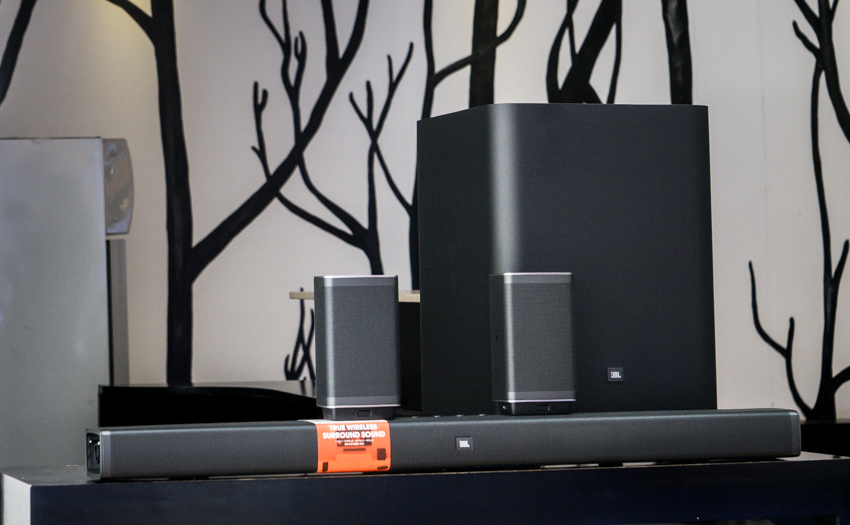
The original JBL Bar 5.1 is a soundbar system with two detachable wireless surround speakers and a separate subwoofer.
It offers physical rear channels without permanent speaker cables across the room.
This model is different from the later JBL Bar 5.1 Surround.
That system uses virtual surround processing and does not include detachable rear speakers.
This guide focuses on the original Bar 5.1 with battery-powered surround units.
The JBL Bar 5.1 is now an older product.
However, its flexible speaker design can still suit movie fans who want simple 5.1 sound.
Used buyers should also consider battery condition, connection support, and replacement-part availability.

JBL Bar 5.1 Overview
The original JBL Bar 5.1 was designed as a convenient alternative to a receiver-based speaker system.
Its most distinctive feature is the pair of detachable surround speakers.
These units connect to both ends of the main soundbar for storage and charging.
For movies, the speakers can be removed and placed beside or behind the viewers.
This creates physical rear channels instead of relying only on reflected or digitally processed sound.
The package also contains a wireless subwoofer.
It handles deep bass that the slim soundbar cannot reproduce effectively.
The system supports conventional 5.1-channel playback.
It does not provide the height channels associated with modern Dolby Atmos systems.
Its main appeal is practical surround sound with minimal wiring.
What Is Included in the System?
The JBL Bar 5.1 system contains three main audio components:
- a central soundbar for the front soundstage and dialogue
- two detachable battery-powered surround speakers
- a separate wireless subwoofer with a 10-inch driver
The original package also included a remote control, calibration microphone, HDMI cable, optical cable, mounting hardware, and power cables.
Accessories may be missing when the system is purchased second-hand.
The complete soundbar measures about 45 inches, or 1148 mm, across.
Each detachable speaker is approximately 6.5 inches, or 165 mm, wide.
Measure the available space before placing the bar below a television.
Detachable Wireless Surround Speakers

The removable surround speakers are the system’s defining feature.
They stay attached to the soundbar when rear-channel playback is not required.
This creates a cleaner and more compact arrangement for daily television viewing.
Detach the speakers when you want a fuller movie experience.
Place the left and right units beside or slightly behind the main seating position.
The narrow side of each speaker should face the listening area.
The speakers communicate with the main soundbar wirelessly.
They do not need signal cables while in use.
However, they contain rechargeable batteries and must be charged regularly.
JBL originally specified up to ten hours of playback.
Actual runtime can be shorter on an older unit.
Battery capacity naturally declines through use, age, and long periods of storage.
The speakers recharge while docked to the soundbar in standby mode.
They can also be charged through their USB connections.
Check the charging contacts if one speaker fails to charge while docked.

Where Should the Surround Speakers Be Placed?
Start by positioning the speakers near ear level.
Place them to the sides of the seating area or slightly behind it.
Avoid hiding them inside cabinets or behind thick furniture.
The speakers do not need to be far from the listener.
A distance of several feet may be enough in a small room.
Balanced placement is more important than maximum separation.
If you are planning the entire room, our
home theater organization guide
explains how to coordinate the screen, seating, speakers, cables, and equipment.
Wireless Subwoofer

The separate subwoofer contains a 10-inch driver.
It adds weight to movie effects, music, and video games.
Its wireless audio connection provides more placement freedom than a conventional signal cable.
The subwoofer still requires an electrical outlet.
It should also have enough open space for ventilation and driver movement.
Do not place objects directly against it.
Start with the subwoofer near the front wall.
Listen from the main seating position and adjust its location if the bass sounds weak or uneven.
Moving it closer to a corner often increases bass output.
However, this can also make certain frequencies sound excessive.
Use the bass controls on the JBL remote to balance the subwoofer with the soundbar.
The goal is firm bass that supports the soundtrack without covering dialogue.
For more placement advice, see our guide to choosing and positioning a
home theater subwoofer.
Connections and TV Compatibility
The original JBL Bar 5.1 offers three HDMI inputs.
It also has one HDMI output with Audio Return Channel support.
Other audio options include optical, analog, Bluetooth, and compatible USB playback.
The HDMI connections support 4K video pass-through and HDCP 2.2.
However, this older system does not provide every feature found on current soundbars.
For example, it uses standard ARC rather than eARC.
Connecting with HDMI ARC
HDMI ARC is usually the simplest connection for a compatible television.
Connect the soundbar’s HDMI output to the TV port marked ARC.
Then enable ARC and HDMI-CEC in the television’s settings.
Manufacturers use different names for HDMI-CEC.
The feature may appear as Anynet+, Simplink, Bravia Sync, Viera Link, or another brand-specific name.
ARC can send television audio to the soundbar.
It may also allow the TV remote to control soundbar volume.
Actual behavior depends on the television and its settings.
Connecting Source Devices
A streaming player, disc player, or game console can connect to one of the soundbar’s HDMI inputs.
The soundbar then passes the video signal to the television.
Alternatively, connect each source directly to the TV.
The television can return compatible audio through ARC or optical.
The better arrangement depends on your equipment and the formats it can pass.
Using an Optical Cable
Optical audio is a useful fallback when ARC is unreliable.
It can carry stereo PCM and compatible compressed surround formats.
It cannot carry the newer lossless formats available through eARC.
If the television produces no sound, check our guide to getting
TV audio through a home cinema system.
Audio Formats and Listening Modes
The original JBL Bar 5.1 supports Dolby Digital, Dolby Pro Logic II, and DTS processing.
It is intended for conventional stereo and 5.1-channel material.
This model does not provide Dolby Atmos height-channel playback.
It should not be advertised as an Atmos soundbar.
The detachable speakers reproduce surround information around the seating area rather than effects above it.
Available sound modes include Standard, Movie, Music, Voice, and Sport.
Each option changes the presentation to suit different content.
Start with Standard mode and compare the alternatives at a moderate volume.
Voice mode may improve speech clarity for some programs.
Movie mode can give effects a more dramatic presentation.
Music mode may provide a different balance for stereo tracks.
The best choice depends on the source and personal preference.
Night Mode
Night mode reduces the difference between quiet and loud sounds.
This can help during late viewing sessions.
According to the manual, it is available with Dolby Digital or DTS soundtracks.
Audio Synchronization
The remote includes audio synchronization controls.
Use them if speech is heard before or after the matching picture.
Adjust the delay in small steps while watching close-up dialogue.
How to Set Up the JBL Bar 5.1
- Place the soundbar below the television without blocking the screen or remote sensor.
- Connect the soundbar to the TV through HDMI ARC or optical audio.
- Connect external players to the TV or the soundbar’s HDMI inputs.
- Place the subwoofer near the front of the room and connect its power cable.
- Dock both surround speakers and allow their batteries to charge.
- Detach the speakers and place them beside or behind the seating area.
- Use the supplied calibration microphone to calibrate the surround channels.
- Test dialogue, surround effects, and bass with familiar content.
Run the Audio Calibration
The original system includes an audio calibration function.
Connect the supplied microphone to the soundbar.
Place the microphone at ear level in the main listening position.
Remove the surround speakers and place them in their normal listening locations.
Keep a clear path between the microphone and each speaker.
Start the calibration and avoid moving or making noise until it finishes.
Calibration helps balance the wireless surround speakers for their locations.
You can still adjust their level afterward if the rear effects sound too strong or too quiet.
JBL Bar 5.1 Sound Quality and Everyday Use

The JBL Bar 5.1 was created for an energetic home cinema experience.
The separate subwoofer gives action scenes and music considerable low-frequency impact.
Dialogue is anchored near the screen by the center channel.
The detachable speakers can provide clearer rear direction than systems based only on virtual surround effects.
Results still depend on speaker placement, the room, and the source soundtrack.
A reflective room may make treble sound sharper.
Rugs, curtains, upholstered seating, and other soft surfaces can reduce excessive reflections.
For casual television, the surround speakers can stay docked.
This keeps the system compact and removes the need to place the speakers before every program.
For films and games, detaching the speakers produces a more convincing surround field.
The difference is most noticeable with properly mixed multichannel content.
JBL Bar 5.1 Advantages and Limitations
Main Advantages
- Physical rear channels: the detachable speakers can sit behind the viewers.
- No permanent rear cables: the surround units operate from rechargeable batteries.
- Strong bass support: the separate 10-inch subwoofer adds impact.
- Several HDMI inputs: source devices can connect through the soundbar.
- Flexible daily use: the rear speakers can remain docked when surround playback is not needed.
- Audio calibration: the supplied microphone helps balance the rear channels.
Important Limitations
- No Dolby Atmos: the system does not produce dedicated height effects.
- No HDMI eARC: it uses the older ARC connection standard.
- Aging batteries: used surround speakers may provide reduced runtime.
- Limited upgrade options: speakers cannot be expanded like a receiver-based system.
- Large subwoofer: the bass unit requires substantial floor space.
- Older platform: it lacks many current streaming and smart-home features.
Buying a Used JBL Bar 5.1
A used JBL Bar 5.1 can still be practical if every component works correctly.
Do not evaluate only the soundbar itself.
The wireless speakers, batteries, subwoofer, remote, and accessories are also important.
Before buying, check the following:
- both surround speakers detach and reconnect correctly
- each surround battery holds a useful charge
- the charging contacts are clean and undamaged
- the subwoofer pairs with the main soundbar
- all HDMI inputs produce stable video and sound
- HDMI ARC works with a compatible television
- the optical and Bluetooth connections function correctly
- the remote control and calibration microphone are included
- the soundbar produces clear dialogue without distortion
Battery condition deserves special attention.
A short demonstration may not reveal weak batteries.
Ask how long the detached speakers operate after a full charge.
Also inspect the docking connectors.
Damaged or dirty contacts can prevent reliable charging.
Replacement parts for an older system may be difficult to locate.
Should You Buy the JBL Bar 5.1 Today?
The JBL Bar 5.1 can suit someone who values physical rear speakers and simple installation.
It is most appealing when found in good condition at a reasonable used price.
A newer soundbar may be a better choice if you want eARC, Dolby Atmos, Wi-Fi streaming, app control, or modern room correction.
Current systems may also have better long-term software support.
A traditional AV receiver and separate speakers offer more upgrade flexibility.
However, that approach requires more equipment, cables, space, and setup work.
The right choice depends on your priorities.
The JBL system emphasizes convenience and removable surrounds.
A component system emphasizes flexibility and future expansion.
Frequently Asked Questions About the JBL Bar 5.1
Does the JBL Bar 5.1 have real surround speakers?
Yes. The original model includes two detachable speakers.
They can be placed beside or behind the listening position for physical rear-channel playback.
Is the JBL Bar 5.1 the same as the JBL Bar 5.1 Surround?
No. They are different products.
The original Bar 5.1 has detachable battery-powered speakers.
The later Bar 5.1 Surround uses MultiBeam processing without separate rear units.
Does the JBL Bar 5.1 support Dolby Atmos?
No. The original JBL Bar 5.1 supports conventional surround formats but not Dolby Atmos height channels.
How long do the detachable speakers operate?
JBL originally specified up to ten hours per charge.
Runtime depends on volume, battery condition, temperature, and the age of the system.
Can the rear speakers remain attached?
Yes. They can stay docked for regular television and music playback.
Detach them when you want physical surround channels around the seating area.
Do the rear speakers charge while attached?
Yes. They charge when docked to the soundbar while the system is in standby.
They can also be charged through their USB connections.
Does the JBL Bar 5.1 have HDMI eARC?
No. This generation provides standard HDMI ARC.
It predates the wider adoption of eARC in home theater products.
Can I connect a game console directly to the soundbar?
Yes. The original model has three HDMI inputs.
However, verify that its video pass-through features match the resolution and refresh rate required by your console and television.
Why is there no sound through HDMI ARC?
Confirm that the cable uses the television’s ARC-labeled port.
Enable ARC, HDMI-CEC, and external-speaker output in the TV settings.
You may also need to change the digital audio output format.
Is the JBL Bar 5.1 worth buying second-hand?
It may be worthwhile if the price reflects its age and every component works.
Test the surround batteries, docking contacts, HDMI ports, subwoofer, remote, and calibration microphone before buying.
Final Thoughts
The original JBL Bar 5.1 remains distinctive because its surround speakers are truly removable.
They create physical rear channels without permanent wiring across the room.
The wireless subwoofer provides strong bass, while the HDMI inputs make the system useful with several source devices.
Its main weaknesses are its older ARC connection, lack of Dolby Atmos, and aging surround batteries.
Existing owners can continue to enjoy a practical 5.1 system.
Used buyers should inspect every component carefully.
Its value depends more on condition and completeness than on the original specifications alone.