JVC Home Theater Guide: Projectors, Setup and Legacy Audio
The company is best known in this category for its D-ILA home cinema projectors.JVC has also produced receivers and packaged audio products. Many of those components are now legacy devices with limited compatibility.
This guide explains JVC projector technology, installation requirements, HDR features, and buying considerations. It also examines the older JVC RX-5062SL receiver and its limitations.
What Does JVC Offer for Home Theater Today?
JVC’s current home theater presence is centered on projectors. Available product families and model names vary by country.
Current and recent projector features may include:
- D-ILA imaging devices
- Native 4K display panels
- Laser light sources
- HDR processing
- Dynamic tone mapping
- Motorized lens adjustment
- Lens-position memories
- Low-latency picture modes
- Higher-resolution e-shift processing on selected models
Not every model includes every feature. Specifications also differ between regional versions.
Check the official product page for your country before buying. Archived models may remain visible on retailer or manufacturer websites.
JVC Audio Equipment
JVC produced many home audio receivers and surround systems in earlier years. These products should not be treated as part of the current projector range.
An older JVC receiver can still reproduce compatible audio. However, it may lack the connections required by a modern television or projector.
What Is JVC D-ILA Technology?
D-ILA is JVC’s implementation of a reflective liquid-crystal display technology. It is used in many JVC home theater projectors.
The projector uses imaging devices to modulate light for the red, green, and blue parts of the picture. The optical system then combines them into one projected image.
Possible advantages of this design include:
- High native contrast
- Smooth pixel structure
- Detailed images
- Strong performance in dark scenes
- Accurate convergence adjustment on supported models
The final picture still depends on the lens, processing, light source, screen, room, and calibration.
D-ILA is a technology name, not a guarantee that every JVC projector performs identically.
Native 4K and JVC 8K e-shift
Resolution terms must be read carefully. Native panel resolution and image-shifting technology describe different things.
Native 4K
A native 4K projector uses imaging devices with a 4K pixel structure. The precise pixel dimensions should be confirmed on the product page.
Native resolution is only one part of image quality. Lens performance, convergence, processing, and focus also affect visible detail.
8K e-shift and e-shiftX
Selected JVC projectors use image-shifting technology to display additional addressable image positions. JVC markets versions of this system as e-shift or e-shiftX.
This should not be confused with using native 8K imaging panels. Check both the native panel resolution and the supported input formats.
Do You Need the Highest Resolution Feature?
The visible benefit depends on screen size, seating distance, source quality, and lens performance. Contrast and HDR handling may create a larger improvement in some rooms.
Our
true 4K projector guide
explains native resolution, pixel shifting, brightness, HDR, and lens features.
Contrast and Black Levels
Contrast describes the difference between dark and bright image areas. It strongly affects picture depth in a dark theater.
JVC D-ILA projectors are often selected for their native contrast performance. However, advertised numbers should be compared carefully.
Native and Dynamic Contrast
Native contrast is measured without relying on a dynamic iris or laser adjustment. Dynamic contrast can include changes made by the light-control system.
These figures should not be treated as interchangeable. Measurement methods may also vary.
The Room Affects Perceived Contrast
Light reflected from pale walls and ceilings can return to the screen. This reduces the visible difference between dark and bright areas.
For the best dark-scene performance, control:
- Windows and daylight
- Light-colored surfaces near the screen
- Bright equipment indicators
- Direct fixture light
- Reflections from glossy furniture
A projector with strong contrast cannot fully compensate for uncontrolled room light.
HDR and JVC Tone Mapping
Projectors cannot reproduce HDR in exactly the same way as a bright direct-view television. The available light must be distributed across a much larger image.
Tone mapping adapts HDR content to the projector and screen. JVC uses features such as Frame Adapt HDR and Theater Optimizer on selected models.
Frame Adapt HDR
Frame Adapt HDR analyzes HDR material and adjusts its presentation. The exact behavior and available controls depend on the projector generation.
Theater Optimizer
Theater Optimizer can use installation information to refine HDR processing on compatible projectors. Relevant settings may include screen size and light-source condition.
The user must still configure the projector correctly. A feature name does not replace screen and room setup.
Check Supported HDR Formats
HDR support varies between models. Confirm compatibility with:
- HDR10
- HDR10+
- Hybrid Log-Gamma
- The formats used by your source devices
Do not assume that every archived JVC projector supports every current format.
Laser and Lamp Light Sources
JVC has produced both lamp-based and laser-based home theater projectors. Each type has practical differences.
Laser Projectors
Selected JVC models use a laser-phosphor light source marketed as BLU-Escent. Benefits may include stable operation and adjustable light output.
A laser projector still produces heat and needs ventilation. Its light source is not normally treated as a user-replaceable lamp.
Lamp Projectors
Older JVC models may use replaceable high-pressure lamps. Brightness and color can change as the lamp ages.
When buying a lamp projector, consider:
- Current lamp hours
- Replacement lamp availability
- Cost of a genuine replacement
- Brightness changes over time
- Correct lamp installation
Avoid unsupported replacement lamps with uncertain specifications. Follow JVC’s instructions for the exact projector.
Brightness Specifications
Do not choose from the maximum lumen figure alone. Screen size, screen gain, picture mode, calibration, and light-source age affect the result.
JVC Projector Installation and Throw Distance
Projector installation should be planned before purchase. The lens must create the required image from the available mounting position.
Use the Exact Projector Calculator
Throw ratio and lens range vary by model. Use JVC’s calculator or the official installation manual.
Enter the intended screen size and aspect ratio. Then verify:
- Minimum and maximum throw distance
- Projector body depth
- Space for rear cables
- Lens shift range
- Mounting height
- Ventilation clearance
Lens Shift
Lens shift moves the image without physically tilting the projector. Available horizontal and vertical ranges depend on the model.
Maximum horizontal and vertical adjustments may not be available simultaneously. Check the installation diagram.
Avoid Digital Keystone When Possible
Physical alignment and lens shift generally preserve more of the image than digital keystone correction.
Mount the projector level and square to the screen whenever practical.
Lens Memory
Selected JVC projectors can store zoom, focus, and lens-shift positions. This is useful with screens designed for more than one aspect ratio.
Lens memory does not physically mask unused parts of the screen. A separate masking system may still be useful.
Choosing a Screen for a JVC Projector
The screen affects brightness, contrast, color, viewing angle, and image uniformity. It should be selected with the projector and room.
Consider:
- Screen width and aspect ratio
- Viewing distance
- Screen gain
- Room light
- Seating width
- Speaker placement
- Acoustically transparent construction
White Screens
A conventional white screen often works well in a dark, controlled theater. It generally provides broad viewing angles.
Ambient-Light-Rejecting Screens
An ALR screen may help in a room with unavoidable ambient light. Its performance depends on the projector position and light direction.
Not every ALR material suits every projector. Viewing angle and image uniformity may change.
Acoustically Transparent Screens
An acoustically transparent screen allows speakers to sit behind the image. This can align dialogue more closely with the picture.
The screen material may affect brightness and sound. Follow spacing and equalization recommendations from the screen manufacturer.
Room Requirements for a JVC Home Theater
A JVC projector can be installed in a dedicated theater or multipurpose room. The expected picture quality depends heavily on light control.
Control Daylight
Use suitable window coverings when the room has exterior light. Light leaking around the edges can still reach the screen.
Reduce Reflections
Dark, low-reflectance finishes near the screen can improve perceived contrast. The entire room does not need to be black.
Give special attention to:
- The front wall
- The ceiling near the screen
- Side walls near the image
- Glossy equipment surfaces
Plan Ventilation
Do not enclose the projector without an engineered cooling path. Follow JVC’s required clearances.
Warm exhaust air should not return directly to an intake. Filters and vents also need maintenance access.
Check Operating Noise
The projector may use higher fan speeds in bright or HDR modes. Avoid placing it immediately beside a viewer’s head.
A ventilated equipment enclosure may reduce audible noise. It must be designed for the projector’s airflow.
Our
home theater design guide
covers screen, seating, lighting, equipment, and room planning.
Connections and Source Devices
Check the HDMI capabilities of the exact projector. Input bandwidth and supported signals vary between generations.
Possible sources include:
- Streaming devices
- UHD disc players
- Game consoles
- Media computers
- AV receivers
Route Sound Separately
A projector is normally used as the display. Audio is handled by a receiver, processor, soundbar, or another audio system.
A common connection path is:
Source device → AV receiver → JVC projector
The receiver must support the required video format. An older receiver may limit resolution, HDR, or refresh rate.
Long HDMI Runs
A ceiling-mounted projector may require a long cable. Use a cable designed and certified for the required signal.
Active copper or optical HDMI may be appropriate for longer distances. Directional cables must be installed in the correct orientation.
Test the full signal before closing walls or ceilings. Install accessible conduit when future replacement is likely.
Gaming with a JVC Projector
Selected JVC projectors offer low-latency modes and higher-refresh-rate inputs. Support varies greatly between models.
Check:
- Supported resolution
- Maximum refresh rate
- Input latency in the required mode
- HDR compatibility
- Available HDMI bandwidth
- Whether image processing is disabled in low-latency mode
Do not assume that a 4K input label guarantees every gaming format. Verify the exact signal combination.
The AV receiver and HDMI cable must also support that signal.
How to Choose a JVC Home Theater Projector
Begin with the room and screen. Do not start with the most expensive model.
1. Decide the Screen Size
Choose a size that suits the seating distance and room width. Test the image size when possible.
2. Confirm the Throw Distance
Use the exact model’s calculator. Include the projector body and cable clearance.
3. Evaluate Room Light
A dark theater prioritizes contrast and black-level performance. A brighter room may require a different screen or viewing strategy.
4. Check HDR Features
Compare tone mapping, supported formats, and available adjustments. Do not judge HDR from brightness alone.
5. Review Lens Features
Motorized focus, zoom, shift, and lens memory can simplify installation. Their ranges differ between models.
6. Check Input Requirements
Confirm every required video format. Gamers should check the complete resolution and refresh-rate combination.
7. Consider Installation Cost
Include:
- Ceiling mount or shelf
- Projection screen
- Long HDMI cable
- Electrical work
- Light control
- Professional calibration when desired
8. Check Regional Warranty
Warranty coverage may depend on the seller and country. Verify that the product is intended for your region.
Buying a Used JVC Projector
Used JVC projectors can provide good value. Condition and remaining support vary widely.
Before buying, check:
- Exact model and regional version
- Total operating hours
- Lamp hours on lamp-based models
- Panel convergence
- Focus uniformity
- HDMI input operation
- Visible dust or image discoloration
- Remote and accessories
- Firmware version
- Availability of replacement parts
Inspect a Uniform Test Image
Display white, gray, red, green, blue, and black test images. Look for discoloration, bright spots, shading, or unusual lines.
Check Convergence
Use a fine white grid or text pattern. Strong color separation around details may indicate alignment or optical issues.
Some models provide electronic convergence adjustment. It cannot correct every physical problem.
Confirm the Included Mount
A ceiling mount may not suit the new room. Check its load rating and compatibility before reusing it.
JVC RX-5062SL Legacy Receiver Overview
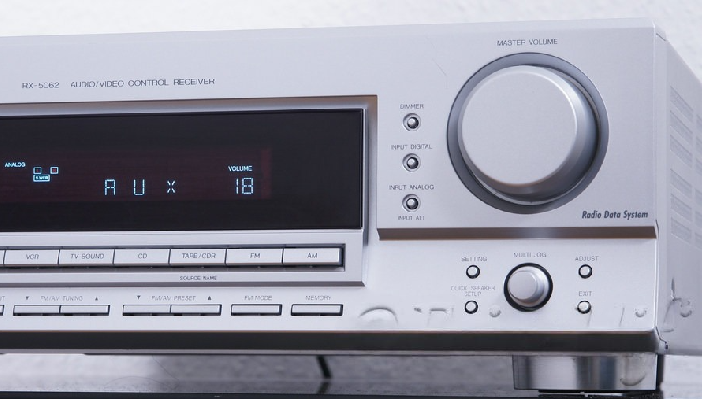
The JVC RX-5062SL, also identified in some documentation as RX-5062S, is a legacy 5.1-channel audio/video receiver. It dates from the mid-2000s.

It should not be described as a modern Dolby Atmos receiver. It lacks HDMI, eARC, network streaming, and current immersive audio decoding.
Main RX-5062SL Features
- Five amplified conventional channels
- Dolby Digital decoding
- Dolby Pro Logic II
- DTS and DTS 96/24 support
- Optical and coaxial digital inputs
- Analog audio inputs
- Composite video switching
- Subwoofer pre-output
- FM and AM tuner
Understanding the Power Rating
JVC documentation lists 100 watts for each channel under specified test conditions. The quoted figure uses an 8-ohm load at 1 kHz with a relatively high permitted distortion level.
It should not be compared directly with modern full-bandwidth ratings measured under different conditions.
Modern Compatibility Limitations
The RX-5062SL has no HDMI input or output. It cannot switch modern digital video or receive television audio through ARC.
Possible connection methods include:
- Optical digital audio
- Coaxial digital audio
- Analog stereo audio
A modern television may provide optical output. Available surround formats depend on the television and source.
Our guide explains
how to send TV sound to an older home theater receiver.
Is the RX-5062SL Still Worth Using?
It may remain useful for a basic 5.1 or stereo system, should be inexpensive and in safe working condition.
It is a poor choice when you need:
- HDMI switching
- ARC or eARC
- Dolby Atmos
- Modern room calibration
- Network streaming
- Current gaming video passthrough
Before using an older receiver, inspect its power cable and ventilation. Stop using it if you notice overheating, smoke, unusual odor, or repeated protection shutdowns.
Building a Complete JVC Home Theater
A JVC projector does not require JVC-branded audio equipment. Choose the remaining components according to compatibility and room needs.
A complete system may include:
- A JVC home theater projector
- A suitable projection screen
- An AV receiver or processor
- Front, center, and surround speakers
- One or more subwoofers
- Streaming or disc sources
- A suitable HDMI connection
- Controlled room lighting
Recommended Planning Order
- Choose the room and seating position.
- Select the intended screen size.
- Confirm the projector throw distance.
- Plan the projector mount and ventilation.
- Choose the screen material.
- Plan speakers and subwoofer positions.
- Select a compatible AV receiver.
- Install and test the HDMI route.
- Control daylight and room reflections.
- Calibrate picture and sound.
Test the projector and cable before completing permanent construction. Keep access to filters, connections, and mounting hardware.
Frequently Asked Questions
Does JVC make home theater systems?
JVC has produced many home audio products. Its current specialist home theater range is primarily associated with D-ILA projectors.
What is a JVC D-ILA projector?
It is a projector using JVC’s reflective liquid-crystal imaging technology. Models differ in resolution, lens, light source, brightness, and processing.
Are JVC projectors native 4K?
Many current and recent models use native 4K imaging devices. Older models may use Full HD panels with e-shift processing.
Is JVC 8K e-shift the same as native 8K?
No. It is an image-shifting system used with the projector’s native imaging devices. Check the native panel resolution separately.
Are JVC projectors good for dark rooms?
JVC D-ILA models are often selected for native contrast performance. The final result depends on the projector, screen, room, and calibration.
Can a JVC projector be used in a living room?
Yes, but ambient light can reduce contrast. Light control and screen selection become especially important.
Does a JVC projector provide sound?
A home theater projector is normally paired with a separate audio system. Check the exact model for any built-in audio features.
Can I connect a game console to a JVC projector?
Yes, when the projector supports the console’s selected signal. Check resolution, refresh rate, HDR, and latency.
Does the JVC RX-5062SL support HDMI?
No. It predates HDMI-based home theater connections and relies on optical, coaxial, analog, and composite connections.
Does the JVC RX-5062SL support Dolby Atmos?
No. It supports older 5.1 formats such as Dolby Digital and DTS, but not Dolby Atmos.
Can the RX-5062SL connect to a modern television?
It may connect through compatible optical or analog audio. The exact options depend on the television’s outputs.
Final Thoughts
A current JVC home theater is best understood as a projector-based system. JVC D-ILA models offer several installation and image-processing options.
Choose the projector from the room, screen size, throw distance, light control, and required inputs. Do not select it from resolution or contrast figures alone.
The JVC RX-5062SL belongs to an earlier generation. It can still serve a basic audio system, but it lacks modern HDMI and immersive-audio features.
Always check the exact model and regional documentation. JVC specifications, firmware, warranties, and available products can differ by market.