How to Properly Install a Mobile Phone Signal Booster
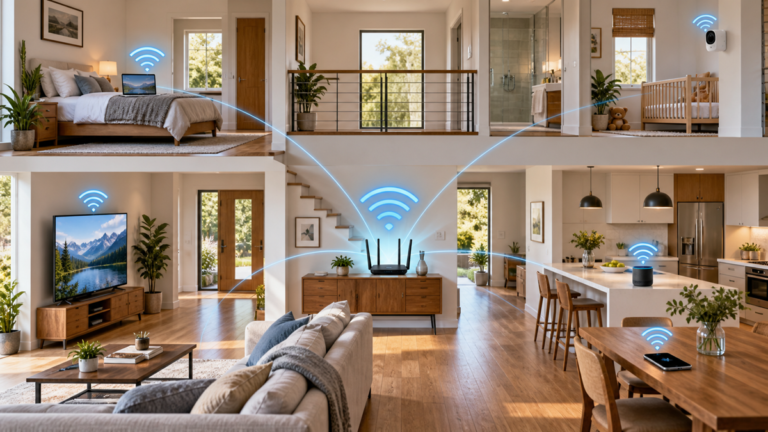
The quality of the installation can affect performance just as much as the booster itself.A booster does not create cellular service where no signal exists. Instead, it receives an available outdoor signal, amplifies supported frequency bands, and redistributes the signal inside the building.
Before beginning, confirm that the equipment supports your operator’s bands and is legally permitted in your country. This guide explains the complete installation process, important safety considerations, and common problems to avoid.
How a Mobile Phone Signal Booster Works
A mobile phone signal booster, also called a cellular repeater, is designed to improve indoor reception when a usable mobile signal already exists outside the building.
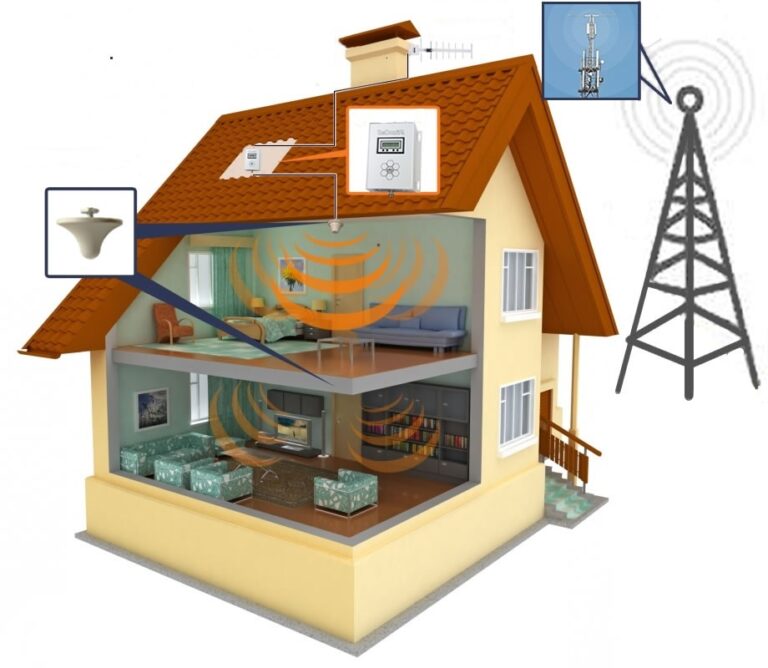
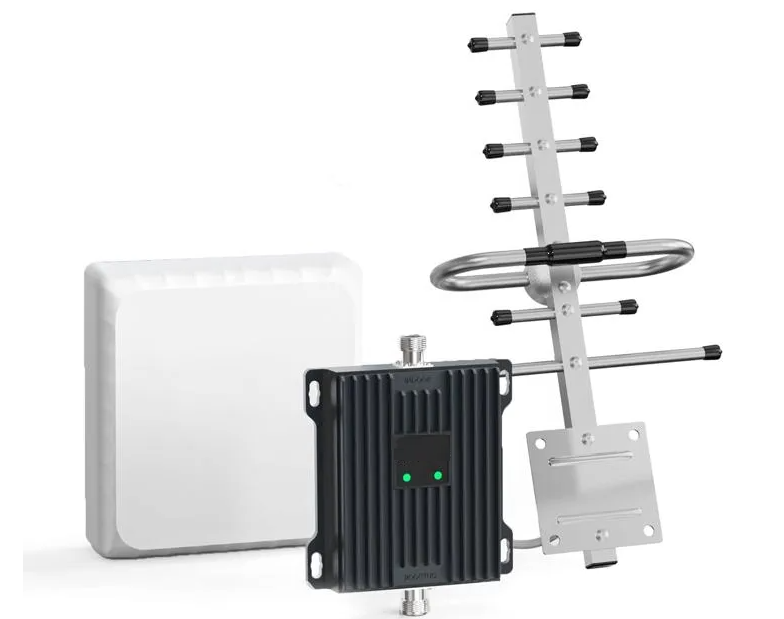
A typical system contains:
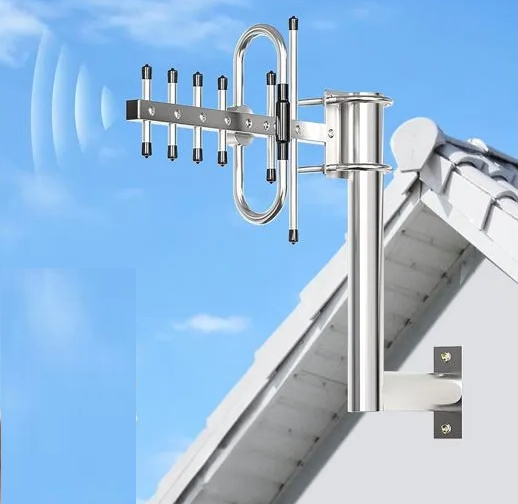
- Outdoor donor antenna: receives signals from the mobile network and transmits signals back toward the base station.
- Coaxial cable: carries radio-frequency signals between the antennas and amplifier.
- Booster unit: amplifies signals within its supported frequency bands.
- Indoor service antenna: exchanges signals with phones inside the coverage area.
The system works in both directions. It must improve not only the downlink from the mobile network to the phone, but also the uplink from the phone back to the network.
Consequently, a phone may display stronger signal bars while calls or uploads remain unreliable if the uplink path is poor.
When a Booster Can Help
A booster may be useful when:
- the outdoor signal is usable but the indoor signal is weak
- thick walls or energy-efficient glazing block mobile reception
- one side of the building receives a stronger signal than another
- the property is located near the edge of a coverage area
- the signal is weak in a basement or internal room
When a Booster May Not Help
A conventional repeater cannot create coverage when no usable donor signal exists outdoors.
Furthermore, it cannot eliminate network congestion, increase the operator’s available capacity, or amplify bands that the equipment does not support.
Check Legal and Network Requirements First
Mobile signal boosters transmit in licensed radio spectrum. Therefore, their installation and operation are regulated.
The rules differ between countries. Depending on the location, users may need:
- approved or certified equipment
- operator consent
- booster registration
- a licence or applicable licence exemption
- professional installation
Do not install an unapproved repeater merely because its advertised frequencies match your operator.
Poorly designed or incorrectly installed boosters can cause interference to the mobile network and other users.
United Kingdom
In the United Kingdom, only mobile repeaters that meet the applicable licence-exemption requirements can be used without an individual licence.
Before purchasing equipment, review
Ofcom’s rules for radio equipment and mobile repeaters.
United States
In the United States, consumer boosters must meet FCC requirements. Users must operate certified equipment, obtain provider consent, and register the booster with the relevant wireless provider.
Consult the
FCC signal booster guidance
and your mobile provider before installation.
Other Countries
For other locations, check the national telecommunications regulator and the mobile operator’s current requirements.
A general conformity mark does not necessarily prove that a particular booster is legal on every network or in every country.
What You Need Before Installation
Before you install a mobile phone signal booster, check that the kit contains every required component.
A typical installation may require:
- a legally permitted and compatible booster
- an outdoor donor antenna
- an indoor service antenna
- approved coaxial cables
- compatible connectors and adapters
- a mounting pole, bracket, or wall mount
- a suitable power source
- weatherproofing materials
- cable clips or approved cable supports
- safe access equipment for the mounting location
Check Band Compatibility
The booster must support the frequency bands used by the target operator at the property.
For example, a network may use a low-frequency band for coverage and a higher-frequency band for additional capacity. A single-band booster will amplify only the band it supports.
Our
4G and 5G signal booster frequency guide
explains how to identify and compare mobile bands.
Read the Manufacturer’s Instructions
Before mounting anything, read the complete installation manual.
Pay particular attention to:
- approved antennas and cables
- minimum antenna isolation
- required ventilation
- indicator lights and alarm codes
- grounding and surge-protection requirements
- permitted mounting locations
Using unapproved antennas, splitters, cables, or power supplies may affect performance, safety, and regulatory compliance.
Step 1: Measure the Outdoor Mobile Signal
Do not select an antenna location based only on the signal bars displayed by a phone.
Signal bars are simplified indicators and may be calculated differently by different devices.
Test Several Locations
Compare signal performance at:
- each side of the building
- upper-floor windows
- balconies
- roof edges where access is safe
- other practical outdoor antenna positions
The highest point is not automatically the best location. Instead, choose a position with a stable signal, acceptable quality, and a practical cable route.
Use Numerical Measurements
Depending on the phone and network, diagnostic information may include:
- RSRP or reference-signal strength
- RSRQ or reference-signal quality
- SINR or a similar signal-quality measurement
- LTE or 5G NR band
- cell identity
- network mode
With negative dBm values, a number closer to zero normally represents a stronger signal. For example, −85 dBm is stronger than −105 dBm.
However, strength alone is not enough. A strong but heavily interfered signal may perform worse than a slightly weaker but cleaner signal.
Test Calls and Data
In addition to numerical readings, make test calls and compare upload and download performance.
Repeat the measurements more than once because phones may switch bands or cells as network conditions change.
Step 2: Install the Outdoor Antenna
Mount the outdoor antenna securely at the location identified during testing.
The position should provide:
- a stable donor signal
- safe and secure mounting
- adequate separation from the indoor antenna
- a practical cable route
- access for future inspection
Directional Antenna
A directional antenna concentrates reception and transmission toward a selected direction.
It may be useful when:
- the serving base station direction is known
- one cell provides a cleaner signal than others
- interference arrives from unwanted directions
- the outdoor signal is weak but measurable
Aim a directional antenna using live signal-quality measurements rather than relying only on the visual direction of a tower.
Make small adjustments and wait for the phone or measurement equipment to update before moving the antenna again.
Omnidirectional Antenna
An omnidirectional antenna receives signals from a wider range of directions.
It may be appropriate when:
- the outdoor signal is already reasonably strong
- the serving cell may change
- several operators must be supported
- precise directional alignment is impractical
However, an omnidirectional antenna may also receive more interference. Therefore, one antenna type is not universally better than the other.
Mount the Antenna Securely
Use the bracket, mast, clamps, and fasteners recommended for the antenna and mounting surface.
Do not mount an antenna to an unstable structure or work at height without suitable access equipment and safety procedures.
Outdoor antenna installations may also require grounding or lightning protection under local electrical and building requirements.
Step 3: Route the Outdoor Coaxial Cable
Run the cable from the outdoor antenna toward the booster using the shortest practical route.
Every coaxial cable introduces signal loss. Moreover, cable loss generally increases with cable length and operating frequency.
Protect the Cable
- Do not crush or sharply bend the cable.
- Do not place excessive tension on connectors.
- Keep the cable away from sharp edges and moving parts.
- Use suitable clips or supports.
- Protect cable where it passes through walls.
- Avoid unnecessary loops and extensions.
Protect Outdoor Connections
Moisture entering a connector or coaxial cable can increase signal loss and cause corrosion.
Weatherproof outdoor connections using the method specified by the equipment manufacturer. Nevertheless, do not wrap or seal components in a way that traps water or obstructs drainage.
Plan Wall Penetrations Carefully
Before drilling, check for electrical cables, plumbing, structural elements, and other concealed services.
Use a suitable sleeve or gland where required, and seal the penetration against water entry.
If you are uncertain about the wall construction or hidden services, use a qualified installer.
Step 4: Position the Booster Unit
Install the amplifier in a dry indoor location with adequate ventilation and access to the required power supply.
Suitable locations may include a utility room, communications cabinet with proper ventilation, hallway cupboard designed for equipment, or another accessible indoor position.
Avoid:
- wet or excessively humid areas
- unventilated enclosed spaces
- direct sunlight
- locations next to strong heat sources
- areas where the unit could be covered by clothing or stored objects
- locations where cables can be pulled or damaged
Do not connect power yet. First, connect the outdoor and indoor antennas according to the manufacturer’s instructions.
Some boosters use clearly marked donor and service ports. Reversing these connections may prevent correct operation.
Step 5: Install the Indoor Antenna
Place the indoor antenna where improved coverage is needed most.
Possible locations include:
- a living room
- a home office
- a central hallway
- a commercial reception area
- another frequently used indoor space
Indoor Panel Antenna
A panel antenna directs coverage toward a selected area.
It can be useful when coverage is needed in one room or when the antenna must face away from the outdoor donor antenna to improve isolation.
Indoor Ceiling Antenna
A ceiling antenna can distribute service around an open area.
However, walls, floors, metal structures, and other obstacles may limit coverage beyond the room where it is installed.
Keep Distance From Users
Follow the manufacturer’s minimum separation requirements between the indoor antenna and people.
Do not position the antenna immediately beside a bed, desk chair, or other location where a person remains for long periods unless the approved instructions allow that placement.
Step 6: Prevent Feedback Between the Antennas
The outdoor and indoor antennas must be sufficiently isolated from each other.
If the indoor antenna’s signal reaches the outdoor antenna too strongly, the system can create feedback known as oscillation. This is comparable to the noise produced when a microphone receives sound from a nearby loudspeaker.
A compliant booster may respond by:
- reducing gain
- displaying an alarm
- disabling one or more bands
- shutting down temporarily
How to Improve Antenna Isolation
Possible methods include:
- increase physical separation
- place walls or floors between the antennas
- aim directional antennas away from each other
- move the indoor antenna farther inside the building
- reduce booster gain only as permitted by the manufacturer
There is no universal distance that works for every system.
The required separation depends on booster gain, antenna gain, building structure, frequency, cable loss, and antenna orientation. Therefore, follow the minimum isolation requirement specified for the exact equipment.
Step 7: Connect Power and Test the Booster
After checking every cable and antenna connection, power on the booster according to the manufacturer’s instructions.
Check the Status Indicators
Inspect all status lights, displays, or application messages.
Possible warnings may indicate:
- antenna oscillation
- excessive donor signal
- insufficient input signal
- incorrect connections
- a disabled frequency band
- another system fault
Do not ignore warning indicators. Consult the manual for the exact meaning of each code.
Test Several Indoor Locations
Compare reception close to the indoor antenna and farther away.
Test:
- incoming and outgoing calls
- call stability
- upload performance
- download performance
- signal strength
- signal quality
Do not judge the result only by signal bars. A successful installation should improve practical service rather than merely change the phone’s icon.
Adjust the Outdoor Antenna
If performance remains weak, make small directional adjustments while monitoring signal quality.
After each adjustment, allow time for the phone and network connection to update.
Covering Multiple Rooms or Floors
One indoor antenna may not provide reliable coverage through several thick walls or reinforced floors.
Larger installations may use:
- multiple indoor antennas
- approved signal splitters
- carefully balanced cable runs
- separate coverage zones
However, each splitter and cable run introduces loss. Adding antennas without calculating the complete system can reduce coverage rather than improve it.
Complex installations may also require greater isolation from the outdoor antenna.
For a large building, commercial property, or multi-floor system, professional design and installation may be more appropriate.
Troubleshooting a Weak or Unstable Result
No Improvement After Installation
Confirm that:
- the booster supports the bands used by the operator
- the outdoor donor signal is usable
- the antennas are connected to the correct ports
- all connectors are secure
- the indoor antenna is in the intended coverage area
The Booster Shows an Oscillation Alarm
Increase the distance and structural separation between the antennas. In addition, adjust their orientation so that they face away from each other where possible.
Good Signal Bars but Poor Data Performance
The network may be congested, the boosted band may have limited capacity, or signal quality may remain poor.
Check RSRQ, SINR, upload performance, and the active band rather than relying only on signal strength.
Calls Work but 4G or 5G Data Does Not Improve
Voice and data may use different bands or network technologies.
Confirm that the booster supports all required frequencies. Also remember that a product advertised as 5G compatible may support only selected 5G bands.
Performance Changes During the Day
Mobile networks adjust to traffic and radio conditions. The phone may also connect to a different band or cell.
Repeat measurements at different times before changing the installation.
The Booster Frequently Reduces Gain
Possible causes include oscillation or an excessively strong donor signal.
Review the device’s status information and follow the manufacturer’s recommended corrective procedure.
Common Signal Booster Installation Mistakes
Using the Wrong Frequency Bands
A booster cannot amplify frequencies it does not support. Always identify the operator’s active bands at the property.
Ignoring Local Regulations
An unauthorized booster may cause interference and may be illegal to operate.
Installing the Antennas Too Close Together
Insufficient isolation can cause oscillation and force the booster to reduce gain or shut down.
Using Excessively Long Cable
Unnecessary cable length increases signal loss, especially at higher frequencies.
Buying Unapproved Cables or Antennas
Components outside the approved system specification can alter gain, emissions, and regulatory compliance.
Mounting the Outdoor Antenna Without Testing
The highest mounting point does not always provide the cleanest or most stable signal.
Leaving Outdoor Connectors Unprotected
Moisture can corrode connectors and enter the coaxial cable.
Blocking Amplifier Ventilation
An enclosed or overheated booster may become unreliable or shut down.
Expecting the Booster to Create Coverage
A conventional repeater needs a usable outdoor donor signal.
Testing Only Download Speed
Calls, uploads, and the mobile uplink are also important. Test the complete service in both directions.
Frequently Asked Questions
Can a signal booster work if there is no signal outside?
Generally, no. A conventional booster requires an existing usable signal to amplify.
If no donor signal is available, consider Wi-Fi Calling, another operator, an operator-managed solution, or another connectivity technology.
How far apart should the indoor and outdoor antennas be?
There is no universal distance.
The required isolation depends on booster gain, antenna gain, building materials, frequency, orientation, and the manufacturer’s requirements.
Does the outdoor antenna have to be on the roof?
Not necessarily. The best position is a safe location that provides a stable usable signal and adequate separation from the indoor antenna.
A wall, balcony, mast, or other suitable exterior location may work.
Is a directional antenna better than an omnidirectional antenna?
A directional antenna can help when one base station provides the best signal and its direction is known.
An omnidirectional antenna may be appropriate when signals arrive from several directions. The correct choice depends on measurements at the property.
Can a signal booster improve 5G?
Only when it supports the exact 5G NR band and network configuration being used.
A general 5G label does not mean that every 5G frequency is supported.
Can I install a mobile phone signal booster myself?
Some approved systems are designed for self-installation in countries where this is permitted.
However, you must follow local regulations and the manufacturer’s instructions. Work at height, grounding, wall drilling, and complex multi-antenna systems may require qualified professionals.
Why does the booster show an alarm?
Common causes include insufficient antenna isolation, excessive incoming signal, weak donor signal, incorrect connections, or another equipment fault.
Check the manufacturer’s alarm guide before making adjustments.
Will a booster improve internet speed?
It may improve performance when weak indoor radio conditions are the main limitation.
However, it cannot eliminate network congestion or exceed the capacity of the mobile network.
Can one booster support several operators?
Some legally permitted multi-operator systems can support several networks.
Nevertheless, the device must cover the required bands and meet the regulator’s rules for multi-operator use.
Final Thoughts
To install a mobile phone signal booster successfully, begin by confirming that the equipment is legal and compatible with the operator’s bands.
Next, identify a stable outdoor donor signal, select the appropriate antenna, minimize cable loss, and create enough isolation between the indoor and outdoor antennas.
Finally, inspect the booster’s status indicators and test calls, uploads, downloads, signal strength, and signal quality throughout the intended coverage area.
When the outdoor signal is usable and every component is installed correctly, a compliant booster can improve indoor mobile service. However, if no donor signal exists, another solution such as Wi-Fi Calling or operator-managed equipment may be more effective.