Smart Door Locks: Compatibility, Security and Setup Guide
Unlike many smart home accessories, a door lock controls physical access to your home. That makes reliability and security more important than flashy features.
The best smart lock is not necessarily the one with the longest feature list. It is the one that fits your door correctly, provides dependable local access and continues to work when your phone, Wi-Fi or cloud service is unavailable.
What Is a Smart Door Lock?
A smart door lock is an electronic locking system that can be controlled using one or more digital methods in addition to, or instead of, a traditional mechanical key.
Depending on the model, access may be provided through:
- a smartphone app;
- a PIN keypad;
- a fingerprint reader;
- NFC or a digital key;
- Bluetooth proximity;
- voice or smart home automation;
- a traditional backup key.
The basic purpose is still the same as a conventional lock: controlling access to a door. The smart features simply add more ways to manage that access.
Door and Lock Compatibility
Compatibility should be checked before purchasing any smart lock.
Smart locks are not universal. Door thickness, backset, lock type, handle placement and the direction in which the door opens can all affect installation.
Check the Existing Lock Type
Common arrangements include:
- single-cylinder deadbolts;
- mortise locks;
- euro cylinder locks;
- multipoint locking systems;
- handle-and-latch combinations.
A lock designed for a North American deadbolt may not fit a European multipoint door, and the reverse is also true.
Measure Before Buying
Manufacturers often provide compatibility diagrams showing the required door thickness and measurements.
Check these dimensions before ordering rather than assuming the lock will fit because the door looks standard.
Also verify that the bolt moves smoothly. A smart lock motor should not have to force a misaligned or sticking deadbolt into position.
Types of Smart Door Locks
Full Lock Replacement
This type replaces most or all of the existing lock hardware.
It can provide a clean integrated installation and may include an exterior keypad or fingerprint reader.
Retrofit Smart Locks
A retrofit lock is installed over part of the existing mechanism, usually on the inside of the door.
One advantage is that the original exterior key cylinder may remain unchanged.
This can be useful for renters or homeowners who do not want to replace the entire lock.
Smart Cylinders
Some systems replace the lock cylinder itself. These can be especially relevant for doors using euro-profile cylinders.
Compatibility must be checked carefully because cylinder dimensions and multipoint locking systems vary.
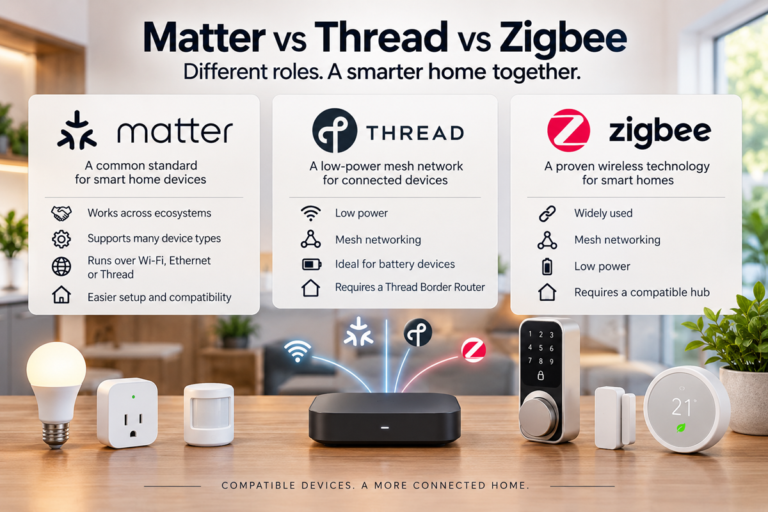
Wi-Fi, Bluetooth, Thread and Matter
Smart locks can use several wireless technologies, and the choice affects battery life, remote access and compatibility.
Bluetooth
Bluetooth is commonly used for nearby smartphone access.
Because Bluetooth consumes relatively little power, it can be well suited to battery-operated locks.
However, Bluetooth alone normally provides only short-range control unless the lock connects to an additional bridge or hub.
Wi-Fi
Wi-Fi can provide direct remote access through the home router.
The advantage is convenience, but constant Wi-Fi connectivity can use more battery power than lower-energy protocols.
Thread
Thread is a low-power mesh networking technology increasingly used in smart home products.
It can be useful for battery-powered devices because it is designed for efficient smart home communication.
Matter
Some newer smart locks support Matter, a connectivity standard developed to improve interoperability between compatible smart home devices and platforms.
Matter does not guarantee that every feature of every lock will work identically on every platform, so it is still important to check the manufacturer’s compatibility information.
Some smart locks can also become part of a wider smart home hub system, allowing door access to interact with lighting, sensors, security devices and other home automations.
Ways to Unlock a Smart Lock
Smartphone App
Most smart locks include an app for locking, unlocking and checking status.
Remote access can be useful when someone needs to enter the home while you are away.
PIN Codes
A keypad allows access without carrying a key or phone.
This is often one of the most practical features because each family member can have a separate code.
Fingerprint Recognition
Fingerprint readers can make entry very fast, but reliability depends on sensor quality, finger position, moisture and environmental conditions.
A fingerprint reader should not be the only available access method.
Traditional Key
Some smart locks retain a mechanical key cylinder.
This can provide useful backup access if the electronics or battery fail.
NFC and Digital Keys
Some locks can use compatible phones or smartwatches as digital keys.
Availability depends on the lock, phone platform and ecosystem.
Guest Codes and Temporary Access
Temporary access is one of the most useful smart lock features.
Instead of leaving a physical key under a mat or giving someone a permanent copy, you may be able to create a temporary access code.
This can be useful for:
- family visitors;
- cleaners;
- contractors;
- pet sitters;
- short-term guests.
Depending on the system, a code may work only during specific days or hours.
When the access period ends, the code can be disabled without changing the physical lock.
Battery Life and Backup Access
Most smart locks operate on batteries because running power wiring to a door is impractical.
Battery life varies depending on:
- wireless technology;
- how often the lock is used;
- motor resistance;
- temperature;
- remote connectivity;
- battery type and quality.
A good smart lock should provide low-battery warnings well before the battery becomes critically low.
What If the Battery Dies?
Backup methods vary between products.
They may include:
- a physical key;
- external emergency power contacts;
- a USB power connection;
- a replaceable battery accessible from outside.
Understand the backup procedure before you install the lock, not after you become locked out.
What Happens Without Internet?
A smart lock should not depend entirely on an internet connection for basic entry.
Many locks continue to support local methods such as:
- PIN codes;
- fingerprints;
- Bluetooth access;
- mechanical keys;
- locally stored digital credentials.
Features that may stop working during an internet outage include:
- remote unlocking;
- remote status checks;
- cloud notifications;
- some voice commands;
- cloud-based automations.
This is why offline access should be considered an essential buying criterion rather than an optional feature.
Security and Privacy
A smart lock combines physical security with digital security, so both sides matter.
Mechanical Security Still Matters
Smart features do not compensate for weak door hardware.
The door frame, strike plate, cylinder and locking mechanism should all be suitable for the door.
Protect the Account
Use a strong, unique password for the lock account and enable multi-factor authentication when the manufacturer supports it.
Keep Firmware Updated
Software updates can fix security issues and improve reliability.
Choose a manufacturer with a clear update policy rather than treating the lock as a device that will never need maintenance.
Review Access Logs Carefully
Some smart locks keep records of locking and unlocking activity.
This can be useful, but it also means access information may be stored locally or in the cloud.
Check the manufacturer’s privacy settings if access history matters to you.
Smart Door Lock Installation and Setup
Step 1: Check Compatibility
Confirm the lock type, dimensions and door thickness before removing the existing hardware.
Step 2: Check Door Alignment
Make sure the existing bolt locks smoothly without needing to push or pull the door.
Step 3: Remove Existing Hardware Carefully
Photograph the original installation before disassembly so you have a reference.
Step 4: Install the Smart Lock
Follow the manufacturer’s instructions for the exact model rather than relying on a generic installation guide.
Step 5: Calibrate the Lock
Some smart locks need to learn the fully locked and fully unlocked positions.
Step 6: Add Access Methods
Configure PIN codes, fingerprints or digital keys only after confirming that the mechanical operation works correctly.
Step 7: Test Backup Access
Before relying on the lock every day, test the mechanical key or emergency power method.
Step 8: Test From Both Sides of the Door
Confirm that locking and unlocking remain smooth when the door is open and closed.
Common Smart Lock Mistakes
Buying Before Measuring
A smart lock may look compatible in product photos but still fail to fit the door.
Ignoring Door Alignment
If a deadbolt already binds against the frame, adding a motor does not fix the underlying problem.
Depending on One Access Method
Do not rely only on a smartphone, fingerprint reader or cloud service.
At least one reliable backup access method is highly desirable.
Ignoring Battery Warnings
Replace batteries before they reach a critically low level.
Giving Permanent Guest Codes
Use temporary or scheduled codes when permanent access is unnecessary.
Forgetting Software Updates
A smart lock is a connected security device. Keeping its software current should be part of routine maintenance.
Final Thoughts
Smart door locks can make home access more convenient, but reliability should always come before convenience.
Before buying, check the physical door and lock type, supported wireless technologies, battery backup options and offline access.
Features such as PIN codes, temporary guest access and remote control can be genuinely useful, especially when they reduce the need to distribute physical keys.
However, the strongest setup combines smart features with good mechanical hardware, secure account settings and a dependable backup method.
Frequently Asked Questions
Do smart door locks work without Wi-Fi?
Many do. Local Bluetooth, PIN codes, fingerprints and mechanical keys can often continue working without internet access. Remote features may become unavailable.
Can I install a smart lock on any door?
No. Compatibility depends on the lock type, door thickness, dimensions and existing hardware.
What happens if a smart lock battery dies?
Backup access varies by model. It may include a traditional key, emergency external power or another backup method.
Are smart locks secure?
A well-designed smart lock can provide secure access, but physical lock quality, account security, software updates and correct installation are all important.
Can I give guests temporary access?
Many smart locks allow temporary or scheduled PIN codes that can be disabled automatically or manually later.
Do Matter smart locks work with every smart home platform?
Not necessarily. Matter improves interoperability, but supported lock features can still vary between platforms and products.