Smart Thermostats: Compatibility, Features and Setup Guide
What Is a Smart Thermostat?
A smart thermostat is a connected temperature controller that manages a home’s heating and, in compatible systems, cooling equipment. Unlike a basic thermostat, it can usually be programmed and adjusted through a smartphone app and may automatically change temperatures according to schedules, occupancy or other conditions.
The word smart can describe several different capabilities. Some thermostats simply provide remote control and scheduling, while more advanced models can learn household routines, detect occupancy, use remote room sensors or integrate with a broader smart home platform.
For most households, the greatest benefit is not the ability to change the temperature from a phone. It is the thermostat’s ability to apply temperature changes consistently without requiring someone to remember to adjust the heating every day.
Heating System Compatibility
Compatibility should be the first thing you check before purchasing a smart thermostat. A device can have excellent software and useful features but still be unsuitable for your heating system.
Depending on the model and region, smart thermostats may support systems such as:
- gas or oil boilers;
- forced-air furnaces;
- central air-conditioning systems;
- air-source heat pumps;
- multi-stage HVAC equipment;
- hydronic underfloor heating;
- zoned heating systems;
- district or communal heating with compatible controls.
Compatibility varies considerably between products. In North America, for example, many smart thermostats are designed around low-voltage 24 V HVAC controls. European heating systems often use different arrangements, including simple relay control, OpenTherm or manufacturer-specific digital communication.
Relay and Modulating Control
A basic relay thermostat generally tells the heating system to turn on or off. When the room falls below the target temperature, heat is requested; when the target is reached, the request stops.
Some modern boilers support digital or modulating control. Instead of simply switching the boiler fully on and off, compatible controls may request different heating outputs. This can allow the boiler to operate more gradually and efficiently.
If your boiler supports a communication protocol such as OpenTherm, check whether the thermostat supports that protocol before buying. Replacing a modulating controller with a simple on/off thermostat can remove some of the original system’s control capabilities.
Heat Pumps Need Extra Attention
Heat pumps can also require more careful compatibility checks. Some systems use auxiliary or backup heat, multiple heating stages or manufacturer-specific controllers.
A thermostat designed only for a simple boiler should therefore not be assumed to work correctly with a heat pump.
Before purchasing, identify the exact type of heating equipment, the existing thermostat and, where possible, the terminals or communication method currently used.
Wiring and Power Requirements
Smart thermostats contain radios, processors, displays and sensors, so they often require a more reliable power source than traditional mechanical or battery-powered thermostats.
The C-Wire
Many North American HVAC installations use a common wire, usually called a C-wire, to provide continuous low-voltage power to the thermostat.
Not every smart thermostat requires one in every installation. Some can operate using alternative power arrangements, while others may require a power adapter or additional wiring.
If the existing thermostat has only two wires, do not assume that a new smart thermostat can simply be connected to them. Check the manufacturer’s compatibility tool first.
High-Voltage Heating
Electric baseboard heaters and other line-voltage heating systems may use 120 V or 240 V controls. These should not be connected directly to a thermostat designed for low-voltage HVAC wiring.
A thermostat must specifically support the voltage and type of heating system being controlled.
Safety note: if you are uncertain about the voltage, boiler terminals or control wiring, use a qualified HVAC technician or electrician rather than experimenting with the connections.
Which Smart Thermostat Features Are Actually Useful?
Manufacturers offer many features, but a few have a much greater effect on everyday use than others.
1. Heating and Cooling Schedules
Scheduling is one of the most useful functions. Instead of maintaining the same temperature 24 hours a day, you can create different settings for:
- morning;
- working hours;
- evening;
- night;
- weekends;
- holidays or extended absences.
A good schedule should reflect the household’s real routine rather than forcing people to adapt to the thermostat.
2. Geofencing
Geofencing uses the location of a household member’s smartphone to determine whether someone is approaching or leaving home.
It can be useful when working hours are irregular, but it needs careful configuration in homes with several occupants. Heating should not automatically switch to an away setting simply because one person’s phone has left the house while somebody else remains at home.
3. Learning Features
Some smart thermostats can observe temperature adjustments and gradually build a schedule around them.
This can reduce manual programming, but automatic learning is not essential. A predictable household may get equally good results from a carefully configured conventional schedule.
4. Energy Reports
Usage reports can show when heating or cooling operated and how patterns changed over time.
These reports are particularly useful for identifying unusual behaviour. For example, a heating system that runs for much longer than expected may indicate an unrealistic temperature setting, poor insulation, an open window, a heating-system problem or unusually cold weather.
5. Smart Home Integration
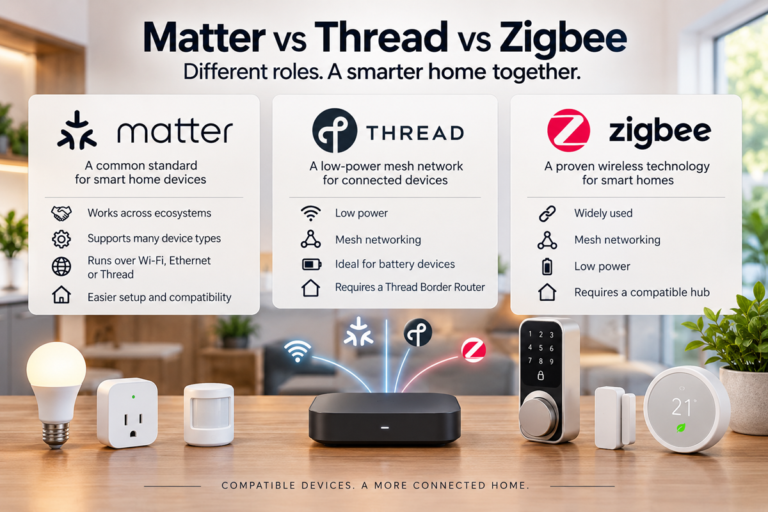
Some thermostats can become part of a broader home automation system and integrate with platforms and protocols such as Google Home, Apple Home, Amazon Alexa or Matter.
This can make voice control and home automations convenient, but platform compatibility should come after heating-system compatibility on your buying checklist. A thermostat’s primary job is still to control the heating correctly.
Room Sensors and Multi-Room Control
A thermostat mounted in a hallway does not necessarily represent the temperature throughout an entire house.
Sunlight, drafts, room size, insulation and radiator placement can produce significant temperature differences between rooms. This is where remote room sensors can help.
Depending on the system, a sensor may measure:
- temperature;
- occupancy;
- humidity;
- sometimes additional environmental conditions.
The thermostat can then use a selected room or an average of several sensors as the reference temperature.
A Sensor Does Not Automatically Create a Heating Zone
This distinction is important. Measuring temperature in several rooms is not the same as independently controlling those rooms.
If one central thermostat controls a single heating circuit, a bedroom sensor cannot normally stop heating only the bedroom while continuing to heat the living room.
True room-by-room control generally requires additional hardware, such as motorized zone valves, HVAC dampers, separate heating circuits or compatible smart radiator valves.

Do Smart Thermostats Work Without the Internet?
For a device controlling something as important as home heating, this is an essential question.
A properly designed thermostat should continue to provide basic local temperature control if the internet connection fails. In fact, ENERGY STAR requires certified smart thermostats to function as basic thermostats when connectivity to the service provider is unavailable.
However, internet-dependent features may stop working. Depending on the product, you may temporarily lose:
- remote smartphone control;
- cloud-based energy reports;
- voice assistant commands;
- remote notifications;
- weather-based optimization;
- some cloud automations.
Local controls and previously stored schedules may continue to operate, but this varies by manufacturer.
Before choosing a thermostat, check exactly which functions remain available during an internet outage. A heating system should not become unusable simply because the router or an external cloud service is unavailable.
Smart Thermostat Installation and Setup
The physical installation is only part of the process. Correct software configuration is just as important.
Step 1: Identify Your Heating System
Determine whether you have a boiler, furnace, heat pump, central HVAC system, underfloor heating or another system.
Step 2: Check Compatibility
Use the thermostat manufacturer’s official compatibility checker when available. Check the model of your existing controller and photograph the wiring before disconnecting anything.
Step 3: Turn Off Power
Switch off power to the heating or HVAC controls before working with thermostat wiring.
Step 4: Label Existing Wires
Do not rely only on wire colours. Labels and terminal positions are more useful because wiring colours can vary between installations.
Step 5: Install and Configure the Thermostat
Follow the manufacturer’s instructions for the specific heating system rather than using a generic wiring diagram found online.
Step 6: Configure a Realistic Schedule
Start with a simple schedule based on when the house is normally occupied and when people sleep.
Step 7: Test the System
Confirm that heating starts and stops correctly and, where relevant, verify cooling, fan operation, heat-pump modes and individual zones.
Step 8: Fine-Tune After a Week
A thermostat rarely needs a perfect schedule on day one. Observe comfort and system behaviour for several days and make small adjustments.
Do Smart Thermostats Really Save Energy?
They can, but the thermostat itself does not magically make a boiler, furnace or heat pump more efficient.
If you are looking for other ways to understand and manage household energy use, our smart plugs guide explains how connected plugs can provide scheduling, remote control and energy monitoring for compatible appliances.
The main opportunity comes from avoiding unnecessary heating or cooling. According to ENERGY STAR, certified smart thermostats save the average U.S. household approximately 8% on heating and cooling bills, although actual results vary by climate, equipment, occupancy and previous thermostat habits.
The potential saving is usually greater when the previous system maintained nearly the same temperature all day, even while nobody was home.
Savings may be smaller when:
- the previous thermostat already had an efficient schedule;
- someone is home almost all day;
- the climate requires little heating or cooling;
- temperature setbacks are very small;
- the building loses heat rapidly;
- occupants frequently override energy-saving settings.
Insulation Still Matters
A smart thermostat cannot compensate for poor insulation, major air leaks or inefficient heating equipment.
If a house loses heat rapidly, the thermostat can reduce unnecessary runtime when possible, but it cannot prevent energy from escaping through poorly insulated walls, roofs, windows or uncontrolled drafts.
Think of a smart thermostat as a control improvement, not a replacement for improving the building itself.
How to Choose the Right Smart Thermostat
Before comparing displays, apps or voice assistants, work through the practical requirements first.
- Identify your heating and cooling equipment.
- Confirm electrical and control compatibility.
- Check whether a C-wire, receiver or adapter is required.
- Determine whether you need single-zone or multi-zone control.
- Check support for room sensors if temperatures vary significantly between rooms.
- Find out what continues working without internet access.
- Check smart home platform compatibility.
- Consider whether important functions require a subscription.
- Check how long the manufacturer provides software and security updates.
Compatibility should always come before appearance. The most advanced thermostat is a poor choice if it cannot properly control your heating system.
Final Thoughts
Smart thermostats can be one of the more practical smart home upgrades because they control equipment that may account for a significant part of household energy use.
The most useful models combine reliable heating control with sensible scheduling, convenient remote access and enough local functionality to keep the home comfortable even when the internet is unavailable.
Room sensors and multi-zone systems can improve comfort further, especially in larger homes where temperatures differ from one room to another. But these features should be matched to the physical heating system rather than treated as software features alone.
Most importantly, realistic expectations matter. A smart thermostat can reduce wasted heating and cooling, but the greatest savings come from combining intelligent temperature control with efficient heating equipment, good insulation and sensible household habits.
Frequently Asked Questions
Do smart thermostats work with every heating system?
No. Compatibility depends on the thermostat, voltage, wiring and type of heating equipment. Boilers, heat pumps, furnaces, electric heating and multi-zone systems can require different controls. Always check compatibility before purchasing.
Does a smart thermostat need Wi-Fi?
Wi-Fi is normally required for remote control and cloud-connected features. Many thermostats can still provide basic local heating control without internet access, but offline capabilities vary between models.
Do I need a C-wire for a smart thermostat?
Some smart thermostats require a C-wire for continuous power, while others can operate without one or use a compatible power adapter. This is particularly important when replacing an older thermostat.
Can smart thermostats control individual rooms?
Not necessarily. Remote sensors can measure temperatures in different rooms, but independent room control usually requires additional zoning equipment, smart radiator valves, dampers or separate heating circuits.
Can a smart thermostat lower my energy bill?
It can reduce energy use when it prevents unnecessary heating or cooling. The actual saving depends on climate, occupancy, previous thermostat settings, insulation and the efficiency of the heating or cooling equipment.
Is professional installation necessary?
Simple compatible systems can sometimes be handled as a DIY installation. Complex boilers, heat pumps, high-voltage heating, multi-stage HVAC and zoned systems are better checked or installed by a qualified professional.